The entries inbox
Every submission lands in FillKite → Entries. The number next to the menu shows how many are new.
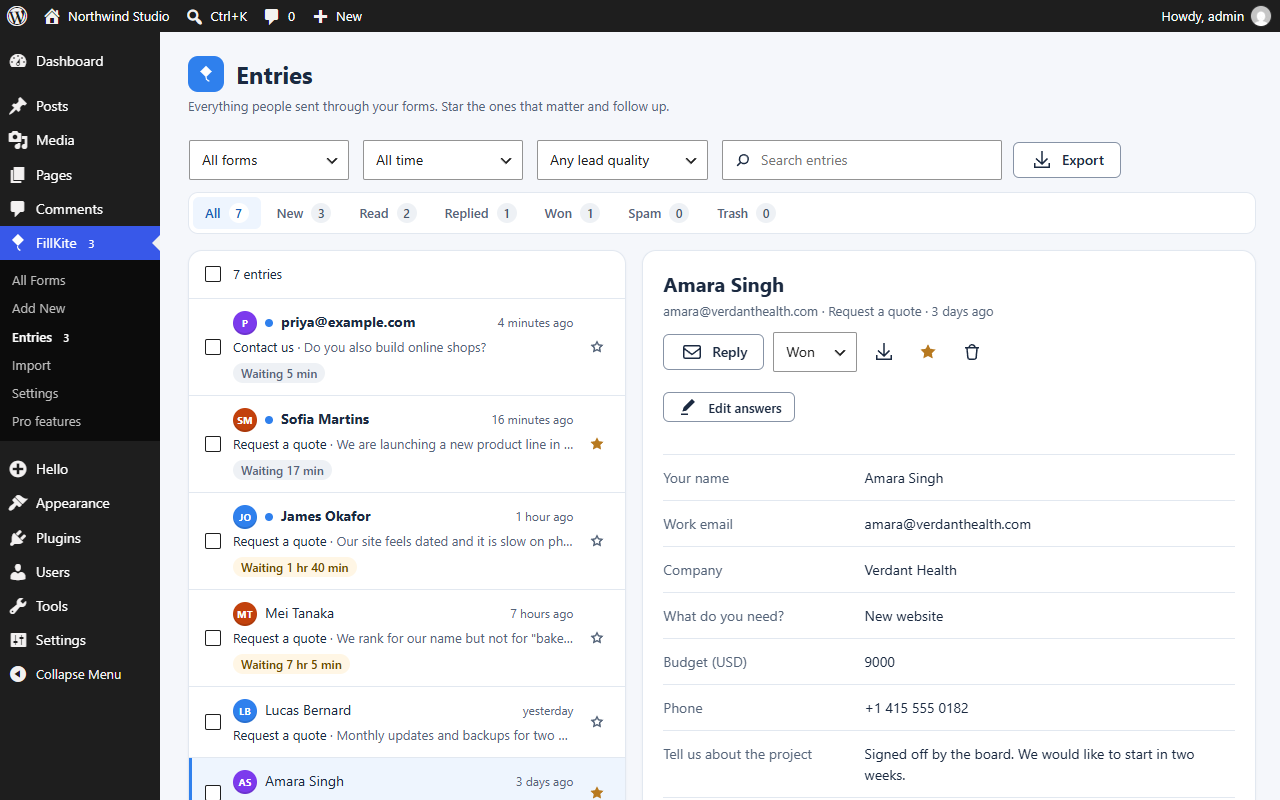
- Statuses: New, Read, Replied, Won and Spam. Opening an entry marks it Read; change the status from the open entry.
- Stars and notes: star the entries that matter, and add private notes for your team.
- Reply: the Reply button opens an email to the sender.
- Find: filter by form and date, or search every answer.
- Bulk actions: tick several entries, then use Mark as… or Move to trash. Trashed entries can be restored, or deleted permanently from the Trash tab.
- Export CSV: download the entries that match your current filters.
- Edit answers: correct an entry’s answers. Every change is kept as a note on the entry (old → new).
- Lead quality: a High, Medium or Low badge on every entry; see Lead quality.
- Print, Excel and JSON: print entries, or export them as CSV, Excel (.xlsx) or JSON (for developers).
- Download PDF: any entry as a real PDF, with or without team notes. Tick several entries to download them as one PDF, one entry per page. The PDF is made on your own server.
- Duplicates: a second entry from the same email to the same form is flagged, never blocked, with a link to the earlier one.
Last updated: