Features
Everything a form needs. Nothing it doesn’t.
The free plugin covers building, {field_types} field types, popups, logic, form rules, lead follow-up, entries, emails, spam protection, tracking, privacy and integrations. Pro adds landing pages, quizzes, payments, CRMs and more.
Free unless markedAll Pro featuresProPaid add-onComing soonNot yet available
Building
Drag fields onto a live canvas, style the form and publish. Start blank or from a template.
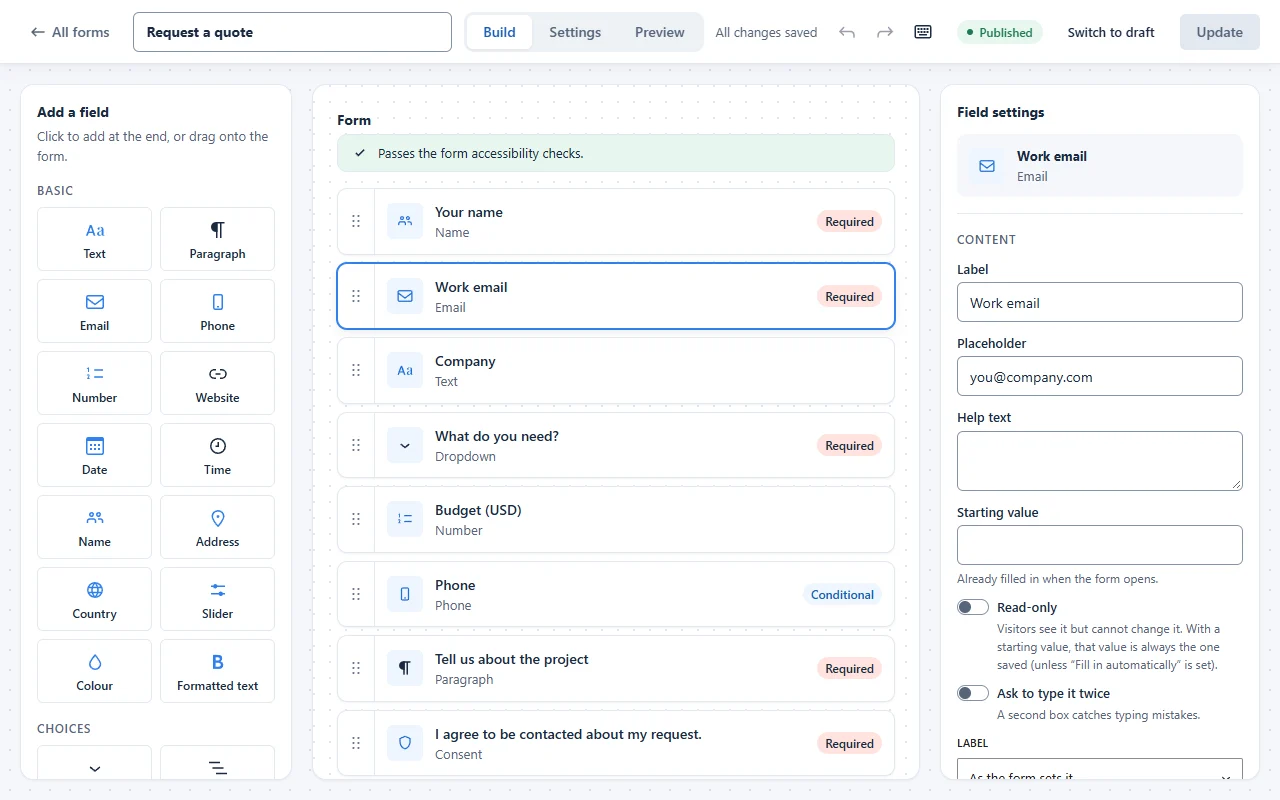
Drag & drop builder
Click or drag fields onto the form, then edit them in a settings panel.
5 ready-made templates
Contact, Quote request, Newsletter, Feedback and Job inquiry, ready to adjust.
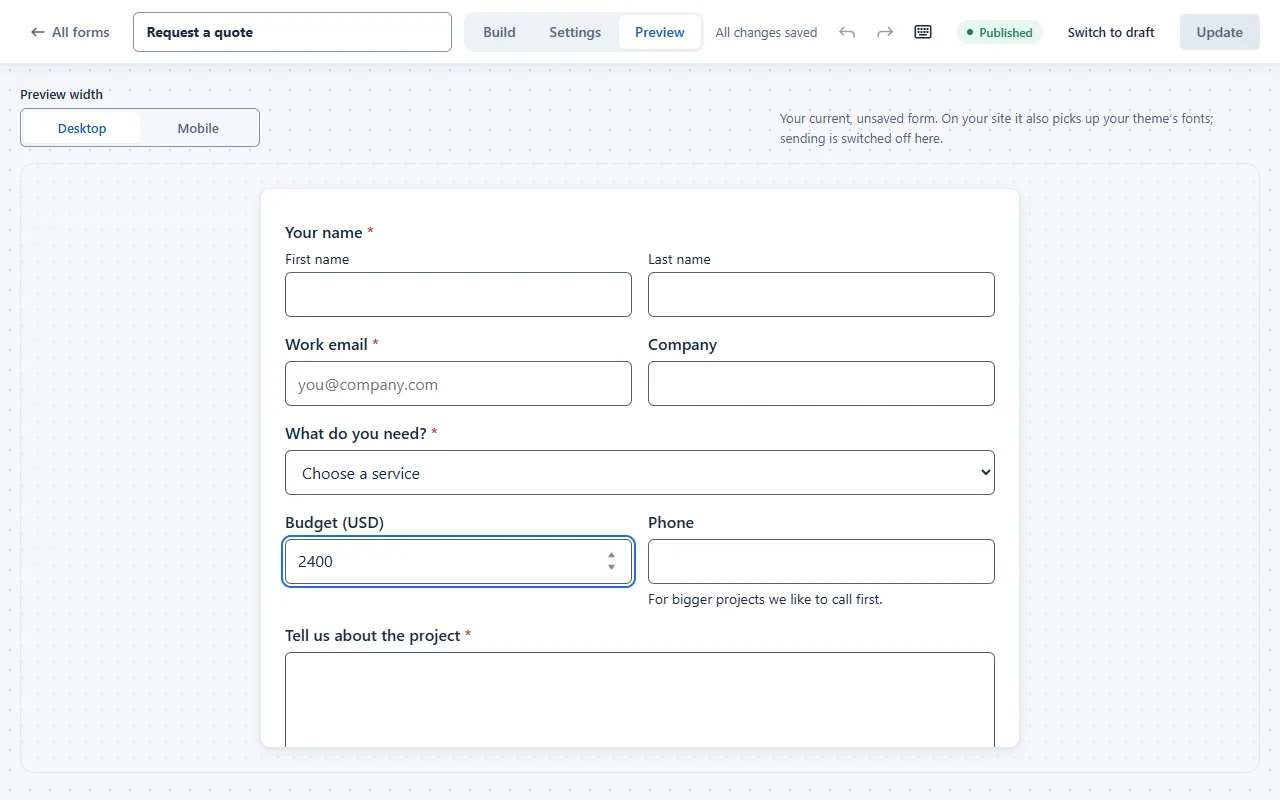
Live preview
See the form with your site’s real form styles before you publish.
Visual form styler
Accent, button, text, background, field and border colours, rounded corners, compact or roomy spacing and a full-width button, with a warning when colours are hard to read.
Flexible widths
Full, half, third, quarter, two-thirds or three-quarters of a row.
Looks right in your theme
Forms pick up your theme’s fonts and colours, with no custom CSS.
Accessibility checks while building
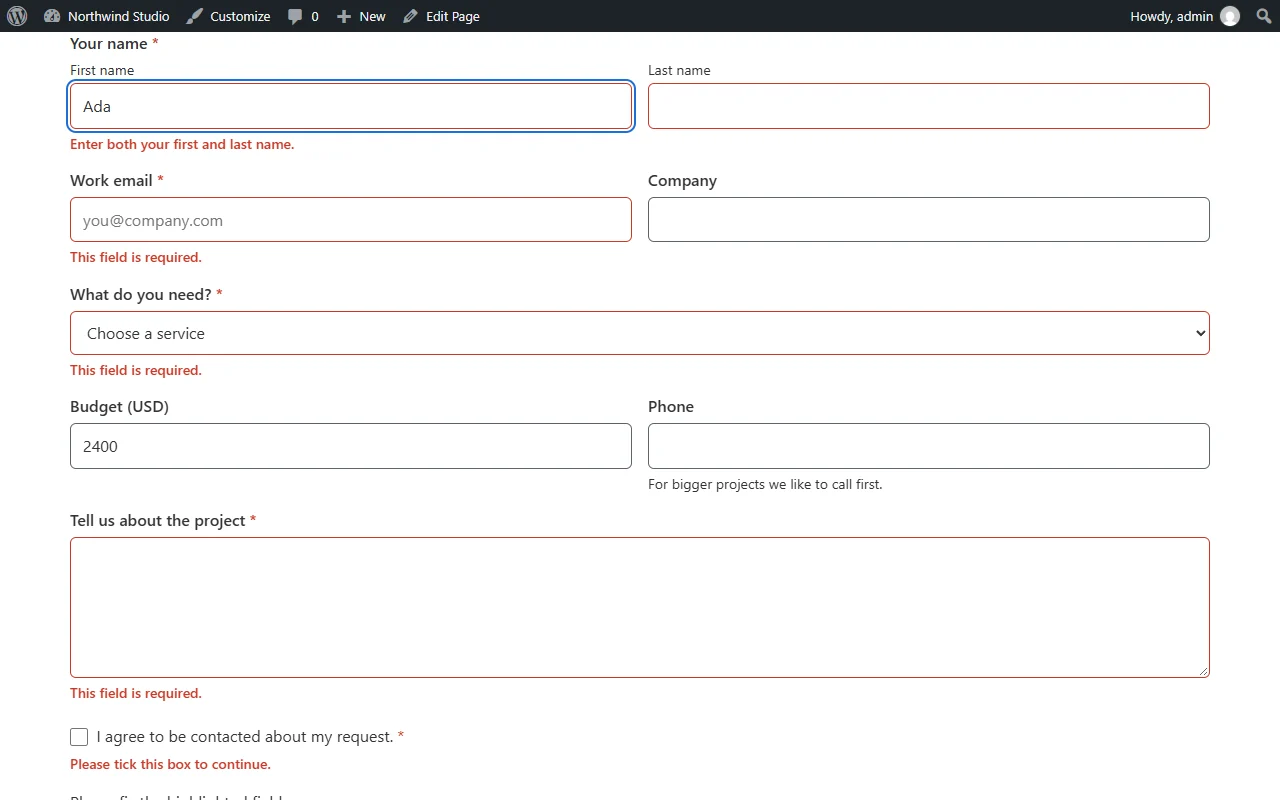
Each field is checked as you edit: missing labels, placeholders used as labels, vague format messages and low-contrast text.
Test mode
Try the published form for real without saving entries or sending emails.
Undo, redo and autosave
Every change can be undone, drafts save as you work, and keyboard shortcuts cover the rest.
Custom CSS classes
Up to five class names on any field and on the form.
Any language, any network
Right-to-left languages and multisite networks are supported.
Multi-step forms
ProComing soonSplit long forms into steps with a progress bar or step list.
White-label
ProComing soonYour own name, menu icon and logo across the admin, builder, entries, emails, block and widget, for client sites. Agency plan.
Fields
29 field types in the free plugin, and every one can be shaped to fit the question.
29 free field types
Text, paragraph, email, phone, number, website, date, time, name, address, country, slider, colour, formatted text, dropdown, multi-select, radio buttons, checkboxes, image choices, rating, Net Promoter Score, Likert scale, checkbox grid, ranking, consent, heading, divider, HTML and hidden value.
Choice layout
Radio buttons and checkboxes one per line, side by side, or in 2 or 3 columns.
Label position
Labels above, beside or hidden (still read by screen readers), for the whole form or one field.
An “Other” choice
Dropdowns, radio buttons and checkboxes can add “Other” with its own text box. Long lists get a search box.
Choice options
Random order, pre-selected choices, “Select all”, fewest and most picks, and “Add many” with ready lists like days, months and US states.
Answer rules
Character or word limits with a live counter, formats like numbers only or postcodes, input masks like (999) 999-9999, allowed answers and blocked words.
Email domains
Accept only chosen email domains, or refuse some, next to the built-in disposable-email list.
Name and address
One box, first and last, or first, middle and last. Choose which address parts to ask for, their labels, layout and starting country.
Date and time
Earliest and latest dates, blocked weekdays and holidays, your date format, a minute step and 12- or 24-hour times.
International phone
An optional country-code picker, with every number saved in one international format.
Numbers, sliders and ratings
Decimal places, a thousands separator, slider tick marks, and ratings as stars, hearts, numbers or smileys.
Field extras
Help text above or below, small, medium or large fields, a starting value, read-only fields and your choice of required marks.
Fill in automatically
Fill any field from the page address (like ?plan=pro) or from the logged-in user.
File uploads
ProComing soonLet people attach files, kept privately on your site, in Google Drive, Dropbox or Amazon S3.
Repeater
ProComing soonRows of fields people add as they need them, such as one row per guest.
Calculation and Products
ProComing soonA live total from other answers, and a products field with quantities, both checked again on your server and payable.
Signature
ProComing soonDraw or type a signature, stored privately.
Dynamic choices and linked dropdowns
ProComing soonChoices from your posts, pages, categories or users, and dropdowns that follow each other (country → city).
Address suggestions
ProComing soonGoogle address suggestions as people type, and a “Use my location” button.
Limits and bookings
ProComing soonStop a choice when it is full (20 seats per session), and limit bookings per day or per time slot.
Form types
Put a form wherever it works best: inline, in a popup, on its own page or one question at a time.
Popup forms
Open any form in a popup from a button, from the shortcode, the block or the Elementor widget.
Check before sending
Show people their answers for a final look before they send.
QR codes
A QR code for the page that shows a form, as SVG or PNG, made in your browser.
Landing pages
ProComing soonA distraction-free page for any form, at its own address.
Conversational forms
ProComing soonOne question at a time, with progress, Enter to go on and auto-advance on single choices.
Polls and surveys
ProComing soonLive results after sending, or anywhere with a shortcode.
Quizzes
ProComing soonGraded, weighted and personality quizzes, with the result after sending and in emails.
Registration and profile forms
ProComing soonLet people sign up and update their profile with a FillKite form.
Post submissions
ProComing soonCreate a post from each entry, with custom fields and ACF.
Offline forms
ProComing soonForms that wait for a connection and send when people are back online.
Logic
Rules you can read out loud decide which fields show, who gets emailed and what people see after sending.
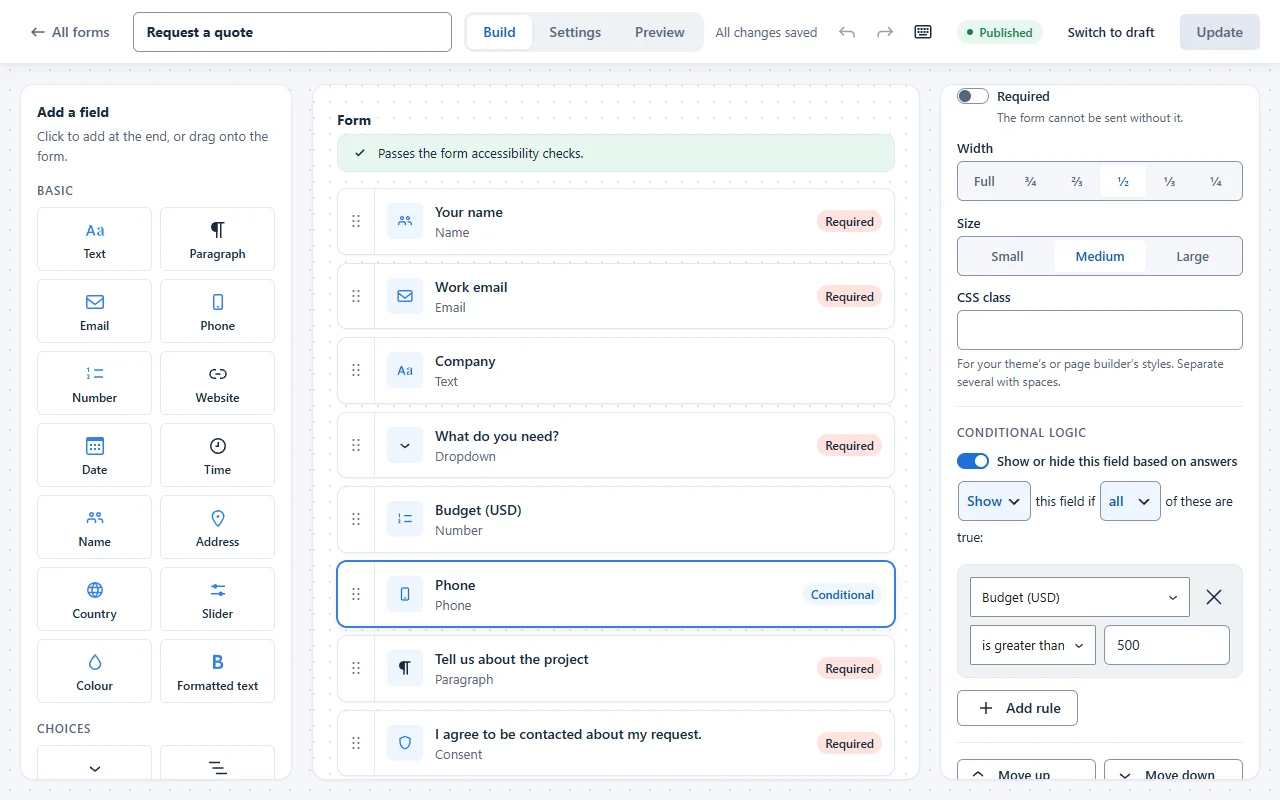
Sentence-style conditional logic
Rules read as plain sentences: If Budget is greater than 500, show Phone.
Show or hide any field
Show or hide a field when all, or any, of your rules are true.
Checked on your server too
Rules run again on your server, so hidden fields are never checked or stored.
Conditional emails
Send a notification only when the answers match, such as Department is Sales → sales@.
Different thank-you by answer
Show another message or go to another page when the answers match. Messages can include the person’s answers.
Form rules
Decide when a form is open, who can fill it in and what has to happen before an entry counts.
Schedule
Open and close a form at a date and time you choose.
Entry limit
Stop after a set number of entries, such as 50 seats.
Who can fill it in
Everyone, logged-in users only, or chosen roles, with an optional “Log in” link.
Message while closed
Your own message shows instead of the form while it is closed.
Password and one entry each
ProComing soonProtect a form with a password, and accept one entry per person or per email.
Double opt-in
ProComing soonThe entry counts only after the person confirms their email.
Approval and moderation
ProComing soonApprove entries before they trigger anything, in steps with assigned people, and flag unwanted content.
Lead follow-up
Most form builders stop when the form is sent. FillKite follows each lead until it is answered, and shows what it was worth.
Never lose a lead
If an email fails, FillKite tries again after 5 minutes, 30 minutes and 2 hours, and the entry shows “Email not sent” with a Send again button.
Email health check
Checks your sender domain (SPF, DKIM, DMARC) with a plain-English fix, and an optional daily test email warns you if emails stop going out.
Speed to lead
Every waiting lead shows how long it has waited, amber after an hour and red after a day, and answered ones show how fast you replied.
Reply reminders
Get an email when a lead is still waiting after 15 minutes, 1 hour, 4 hours or a day. The inbox shows your average first-reply time.
Lead quality badge
High, medium or low for every entry, from the email domain, company or free mailbox, duplicates, spam score and answers given. Sort best leads first.
Reply from the inbox
ProComing soonWrite the reply right on the entry, starting from saved templates with merge tags. The entry is marked Replied.
Revenue per source
ProComing soonAdd what a Won lead was worth, then see leads, wins, win rate and revenue per form, page, source, campaign and referring site.
Follow-up emails
ProComing soonSend a delayed email after an entry, such as a check-in two days later.
Entries
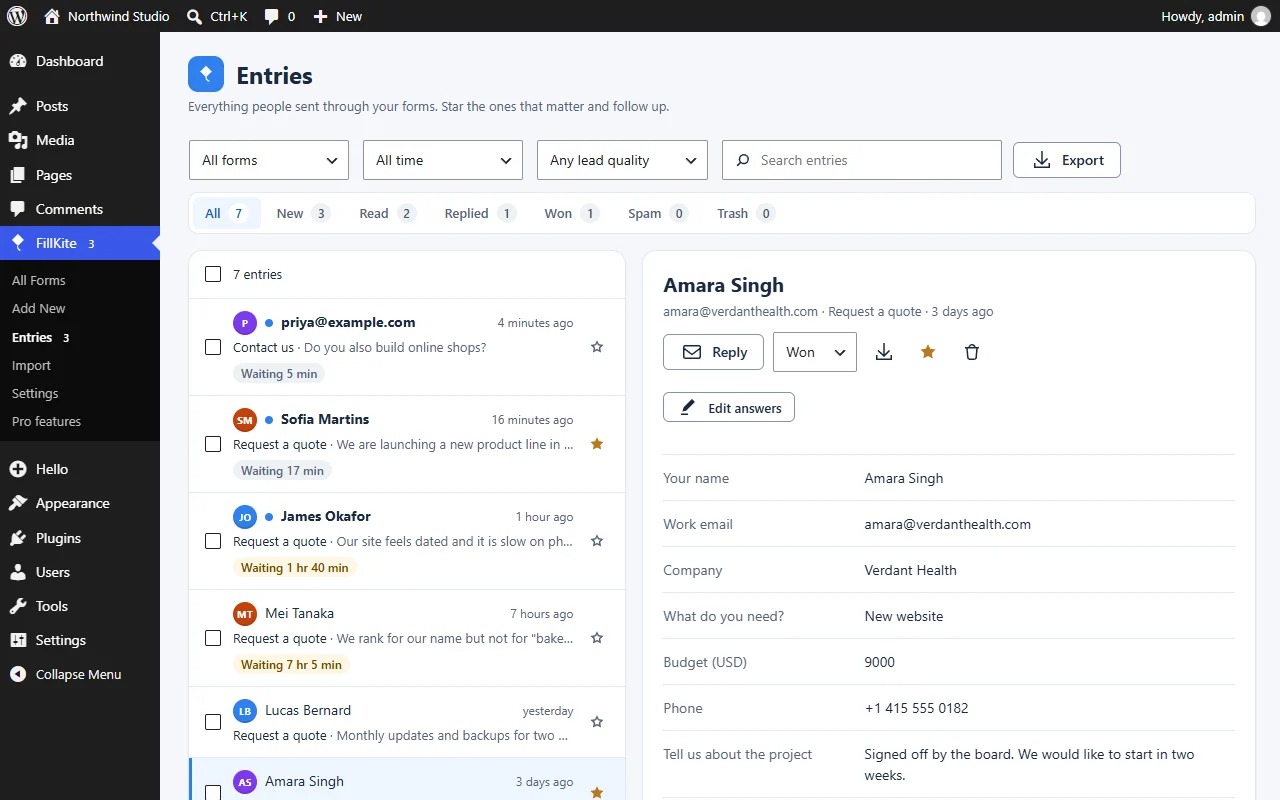
Every submission lands in an inbox that works like email.
Entries inbox
Statuses for every entry: New, Read, Replied, Won and Spam.
Stars and notes
Star the entries that matter and add private notes for your team.
Search and bulk actions
Search everything, filter by form and date, and act on many entries at once.
Edit answers
Correct an entry’s answers. Every change is kept as a note, old → new.
PDF and print
Download any entry, or several at once, as a real PDF made on your own server, or print them.
Export and import
Export to CSV, Excel or JSON, and import entries from a CSV file with column matching.
Duplicate detection
Repeat submissions from the same email are flagged, never lost.
Branded PDFs
ProComing soonYour logo, colour, header and footer on entry PDFs, attached to emails if you like.
Reports
ProComing soonEntries, views, conversion, averages, entries per day and charts of the answers for each form, as a PDF too.
Entries on your site
ProComing soonShow entries as tables or cards on any page, and let senders edit their own entry from a private link.
Partial entries
ProComing soonKeep what people typed even if they leave before submitting.
Emails
Know the moment a form comes in, let the sender know, and make sure the email arrives.
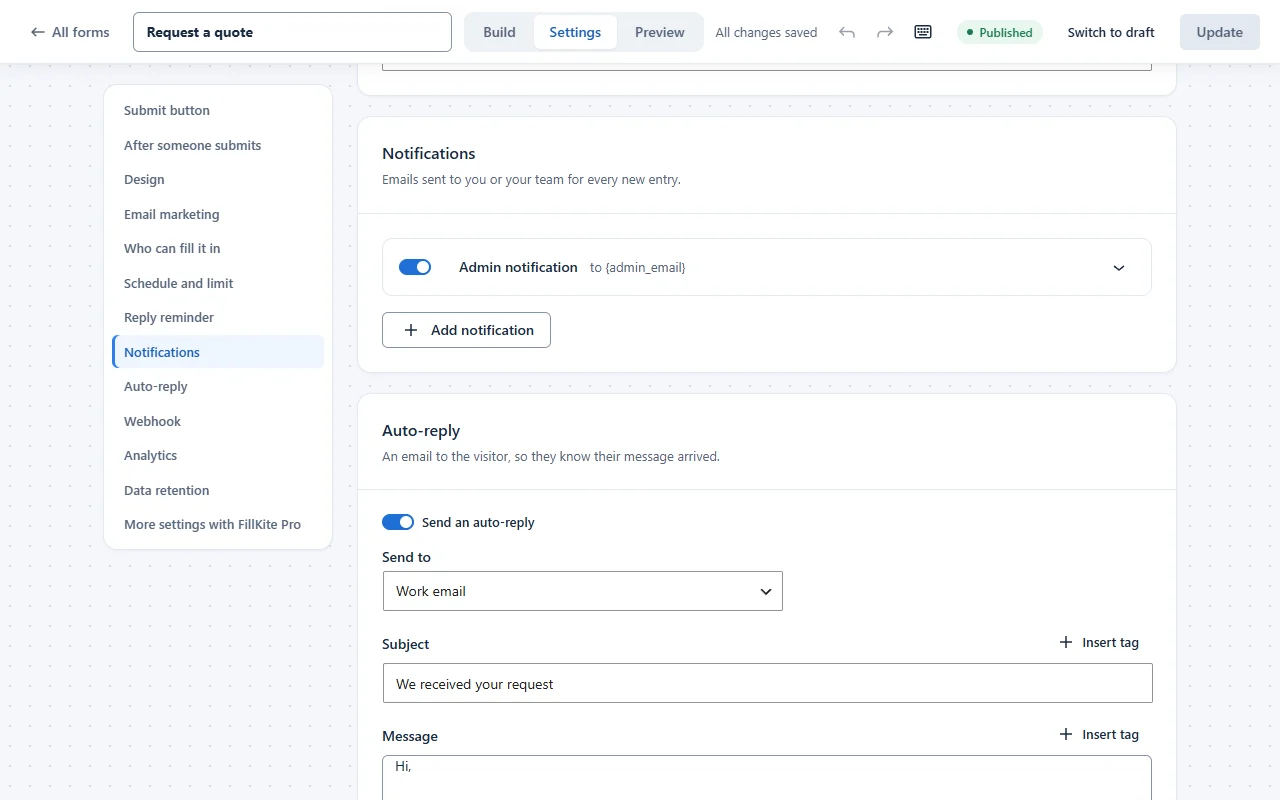
Email notifications
An admin email out of the box, and up to ten per form.
CC and BCC
Copy other people in on any notification. BCC stays hidden, even in the log.
Merge tags
Put any answer in an email, plus {all_fields}, {page_url}, {entry_url} and more.
Auto-reply
Send the person who filled in the form an automatic confirmation.
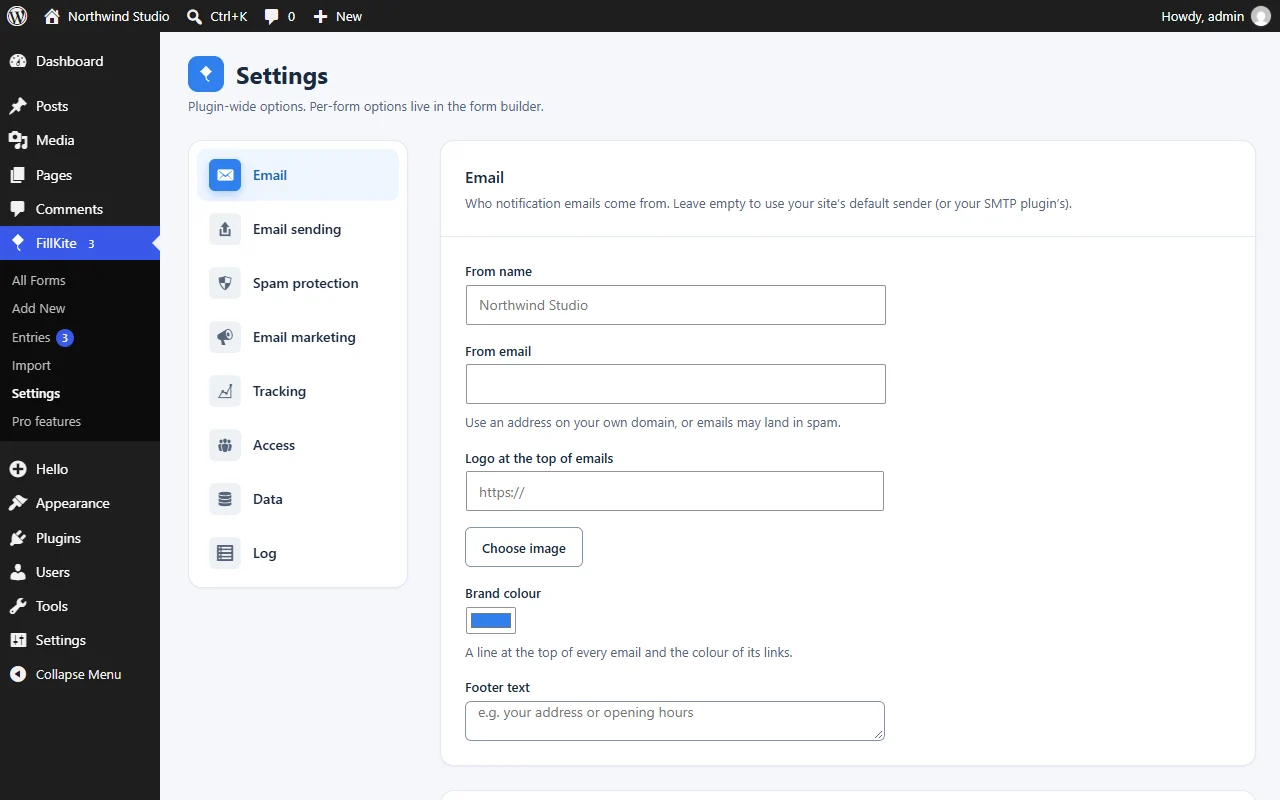
Branded emails
Your logo, colour and footer on every FillKite email.
Weekly summary
A weekly email with the entries each form received.
Built-in SMTP
Send every site email through your mail server, with the password stored encrypted and a test email. No extra plugin.
Webhooks and delivery log
Send each entry to Zapier, Make or your own app, and see which emails and webhooks went out.
Scheduled exports
ProComing soonEntries emailed as a CSV file on a schedule.
Spam protection
Quiet protection that stops bots, including the new AI ones, without puzzles for real people.
Honeypot and time check
A hidden field and a speed check catch bots and stay invisible to people.
Explainable spam score
A local score from links, pasted or rushed text, repeated answers and spam phrases. Every Spam entry says why, and “Not spam” teaches your site. No cloud service.
Akismet
Also ask Akismet when it is active on your site. Optional.
Rate limit
Limit how many entries one visitor can send to a form (10 an hour by default).
Disposable email blocking
A built-in list of nearly 9,000 throwaway email domains. Nothing is downloaded.
Email domain check
Checks that an email address’s domain can actually receive mail.
Turnstile, hCaptcha or reCAPTCHA v3
Optional. Add a CAPTCHA only if you want one.
Tracking
See where your leads come from and how each form performs, without cookies.
UTM capture
UTM tags, referrer and landing page saved with every entry, without cookies.
Views and conversion rate
How many people saw each form in the last 30 days, and how many sent it.
GA4 events
Sends generate_lead on submit when Google Analytics is already on your site.
Meta Pixel events
Sends Lead on submit when the Meta Pixel is already on your site.
Visitor journey
ProComing soonThe pages a person saw before sending, on each entry.
Drop-off analytics
ProComing soonSee where people give up on a form.
Privacy and access
Built for GDPR and for teams, with your data in your own database.
Consent receipts
Each ticked consent box keeps the exact wording, its version, the time and page, sealed so later changes show. Print the proof per entry.
Data retention
Delete entries automatically after a number of days you choose. Spam is cleared after 30 days.
IP addresses hashed
IP addresses are stored only as a hash, never in plain text.
Role manager
Decide which roles can build forms and which can see entries, separately.
Your data stays yours
Forms and entries live in your WordPress database. Delete everything on uninstall only if you choose to.
Integrations
Fits the tools you already build with, and the services you sell through.
Mailchimp and Brevo
Add the people who send a form to a list, with name fields, an optional consent box, and double opt-in and tags for Mailchimp.
Elementor widget
Style controls that start from your kit’s global colours and fonts.
Gutenberg block and shortcode
Drop a form into any post or page with the block, or use anywhere else.
WooCommerce
Show a form in its own tab on a product page. Entries know which product they came from.
Uncanny Automator
Start any Automator recipe when someone submits a form.
Import from Contact Form 7 and WPForms
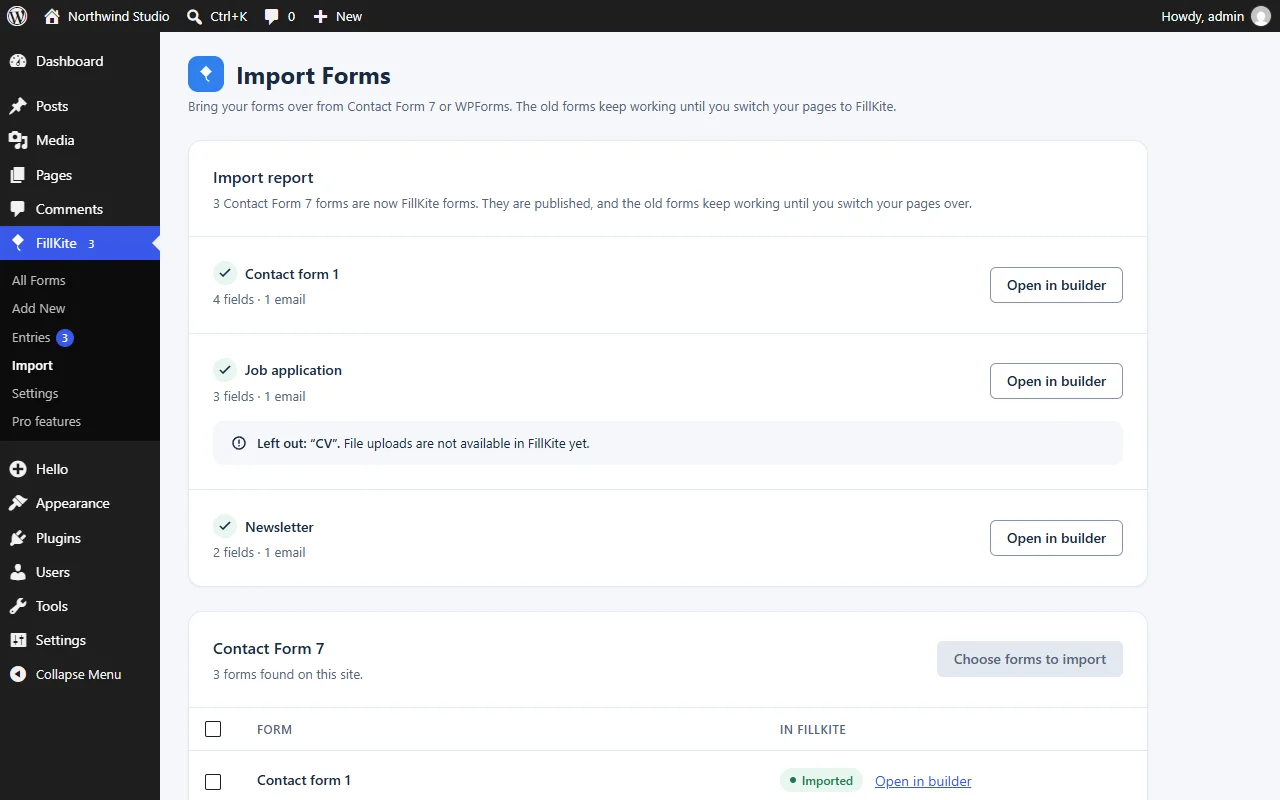
Fields, notifications, auto-replies and messages, even with those plugins switched off, then switch your pages with a preview.
Form finder
See which pages use each form.
Move forms between sites
Export forms to a file and import them on another site.
WP-CLI
List forms and entries and export entries from the command line.
11 more email marketing services
ProComing soonMailerLite, Kit, ActiveCampaign, GetResponse, Campaign Monitor, Drip, Klaviyo, SendGrid, EmailOctopus, CleverReach and MailPoet.
CRMs and apps
ProComing soonHubSpot, Salesforce, Pipedrive, Zoho CRM, Insightly, Capsule, OnePageCRM, Airtable, Notion, Trello, Asana and Google Calendar.
Team alerts
ProComing soonSend entries to Slack, Discord, Telegram, Twilio SMS and ClickSend.
Payments with no platform fee
ProComing soonStripe (with subscriptions), PayPal, Square, Mollie, Razorpay, Paystack, Authorize.Net, Mercado Pago, 2Checkout and Elavon, with your own keys.
Google Sheets and Drive
ProComing soonSend new entries to a Google Sheet, and keep uploaded files in your own Google Drive.
Screenshots
The plugin as it is today.
Launching soon
Be first when FillKite takes off.
Join the waitlist and get one email when FillKite is live on WordPress.org.