Free · On WordPress.org
Forms that fly.
Leads that land.
Every lead delivered, real, answered and counted. Failed emails retry by themselves, every lead shows how long it has waited, and you see which campaign paid off.
- Failed emails retried automatically
- A reply timer on every lead
- Bots stopped without puzzles
Fields
Tell us about your project
We reply within one working day.
Show this field
Works with Elementor, Gutenberg and any theme
- Elementor
- Gutenberg
- Any WordPress theme
Why FillKite
Everything you need. Nothing that weighs you down.
The parts of a form builder you use every day, built to be quick to learn and light on your site.
Logic that reads like a sentence
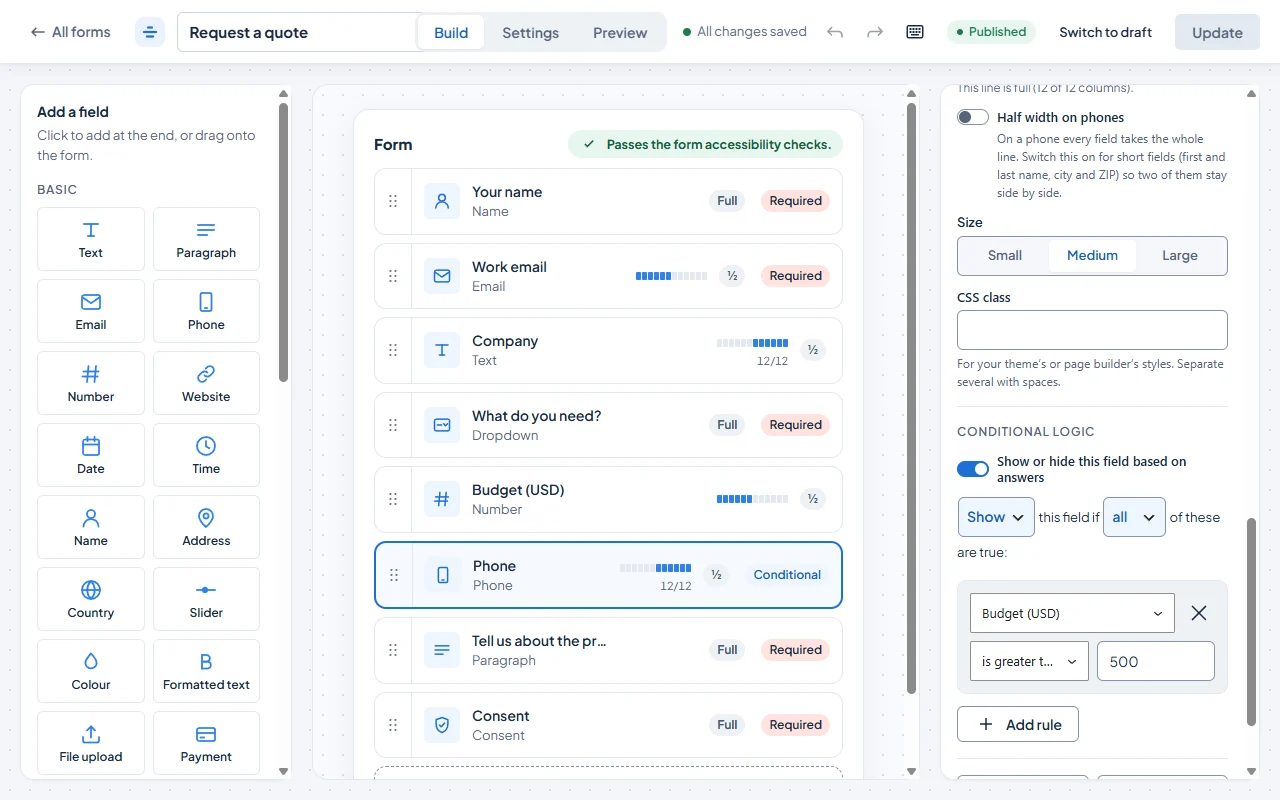
"If Budget is greater than 500, show Phone." The same rules decide who gets emailed and what people see after sending.
An inbox for your entries
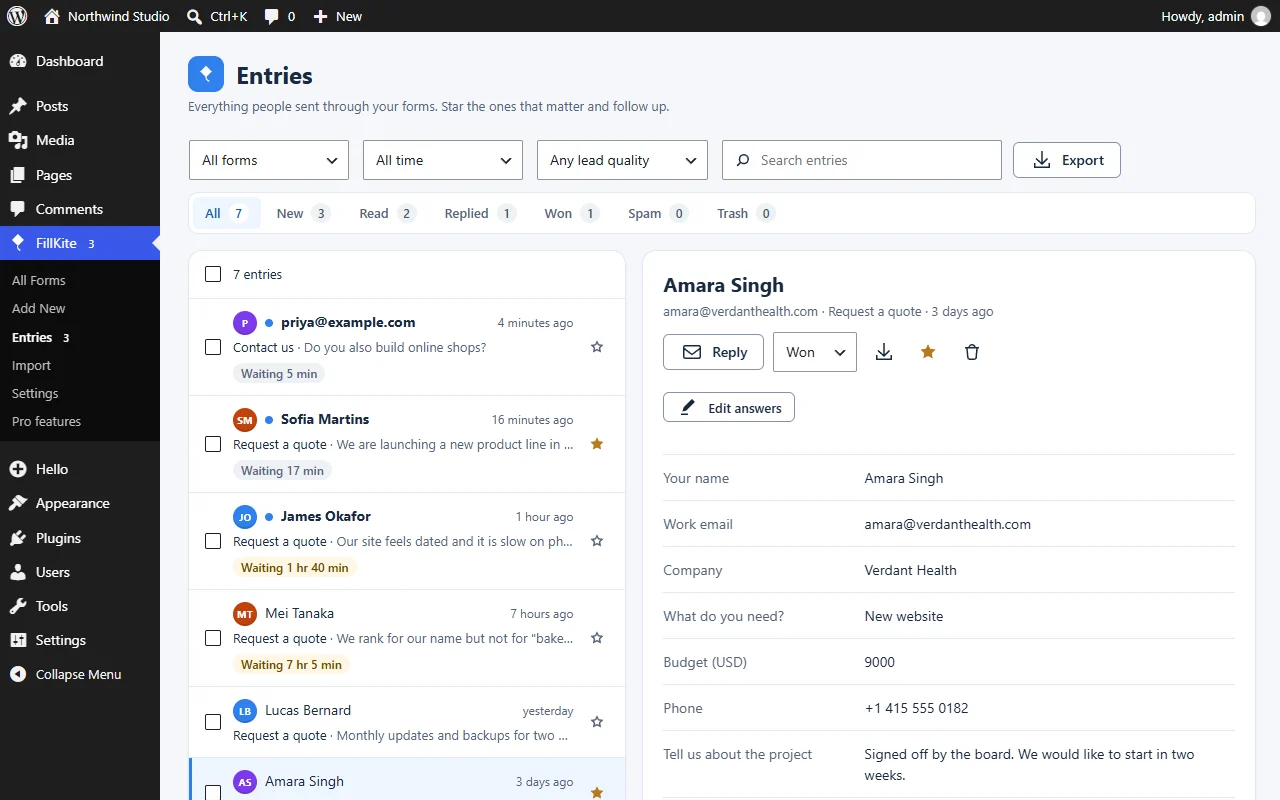
Statuses from New to Won, a reply timer, notes, edits and PDFs, just like working through email.
Lightweight by design
About 11 KB per form, and nothing at all on pages without one.
One-click import
Bring your forms over from Contact Form 7 and WPForms without rebuilding them.
Lead data built in
UTM tags, referrer and landing page saved with every lead, without cookies. Pro adds revenue per campaign.
29 fields, shaped your way
From ratings and Likert scales to international phone numbers, with layouts, masks and answer rules. Free.
Leads that land
Every lead delivered, answered and counted.
Most form builders stop when the form is sent. FillKite follows each lead until it is answered, and shows what it was worth.
Never lose a lead
If an email fails, FillKite tries again after 5 minutes, 30 minutes and 2 hours, and the entry shows a Send again button. A daily self-test and a sender-domain check warn you before leads go missing.
Answer while it’s warm
Every lead shows how long it has waited, amber after an hour and red after a day. Reminders reach you when a lead is still waiting, and the inbox shows your average reply time.
See what paid off Pro
Add what a Won lead was worth, then see leads, wins, win rate and revenue per form, page, source, campaign and referring site.
The real thing
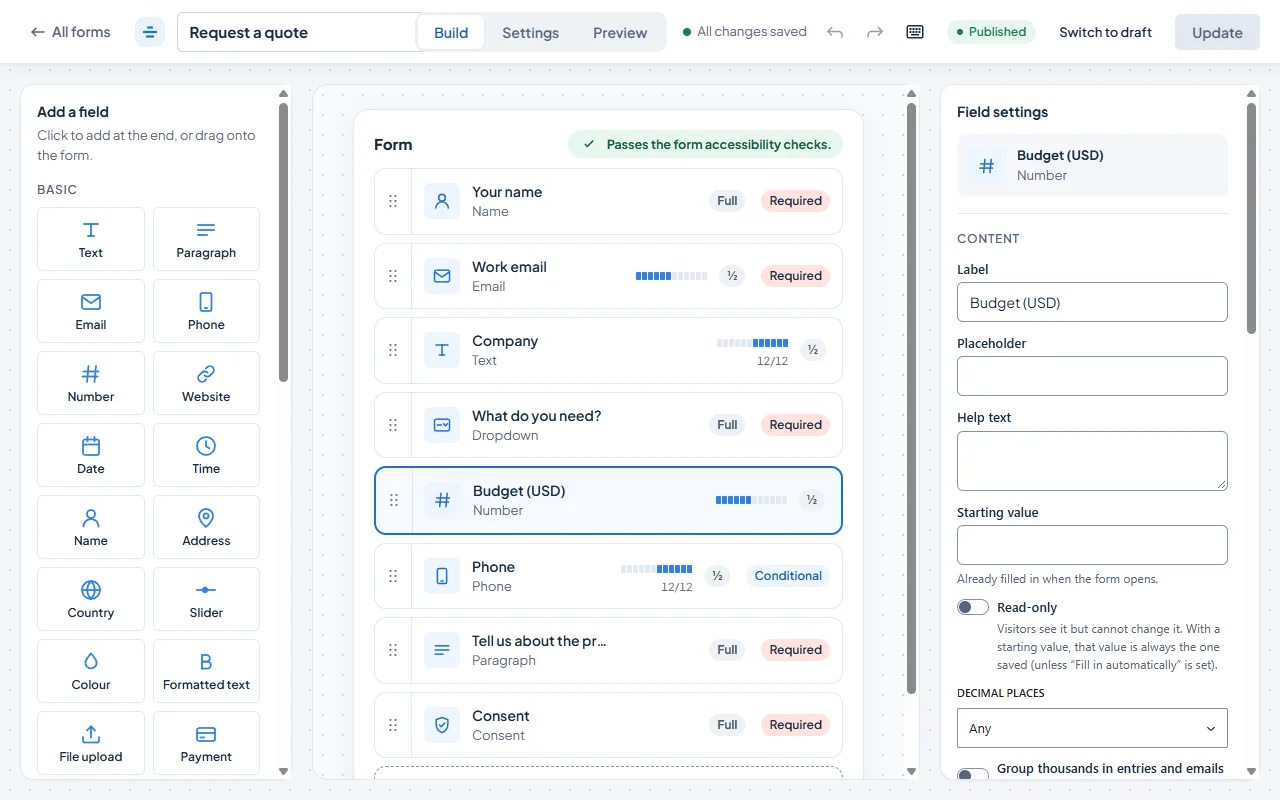
See FillKite in action.
Screenshots from the plugin as it is today.
Conditional logic
Logic you can read out loud.
Every rule reads as a plain sentence, so you can check a form’s behaviour in seconds.
- Pick a field, a condition and a value. No code.
- Show or hide any field when all, or any, of your rules are true.
- Rules run in the browser and again on your server, so hidden fields are never checked or stored.
If Budget is greater than 500 then show Phone
+ Add ruleProject enquiry: Budget 750, looking to start in May
Note: Call back Thursday with a quote.
Contact: Do you ship to Italy?
Project enquiry: Budget 2,000, full redesign
Newsletter: Subscribed from /blog
Entries inbox
Entries you can actually work through.
Every submission lands in an inbox that works like email. Sort it, tag it, follow it up, and see which leads turned into work.
- Statuses for every entry: New, Read, Replied, Won and Spam.
- Stars and private notes, so the whole team knows what happened.
- A reply timer on every lead, with reminders when one is still waiting.
- Edit answers, and download any entry as a PDF.
- Search, filter by form and date, and act on many entries at once.
Switching
Switch in one click.
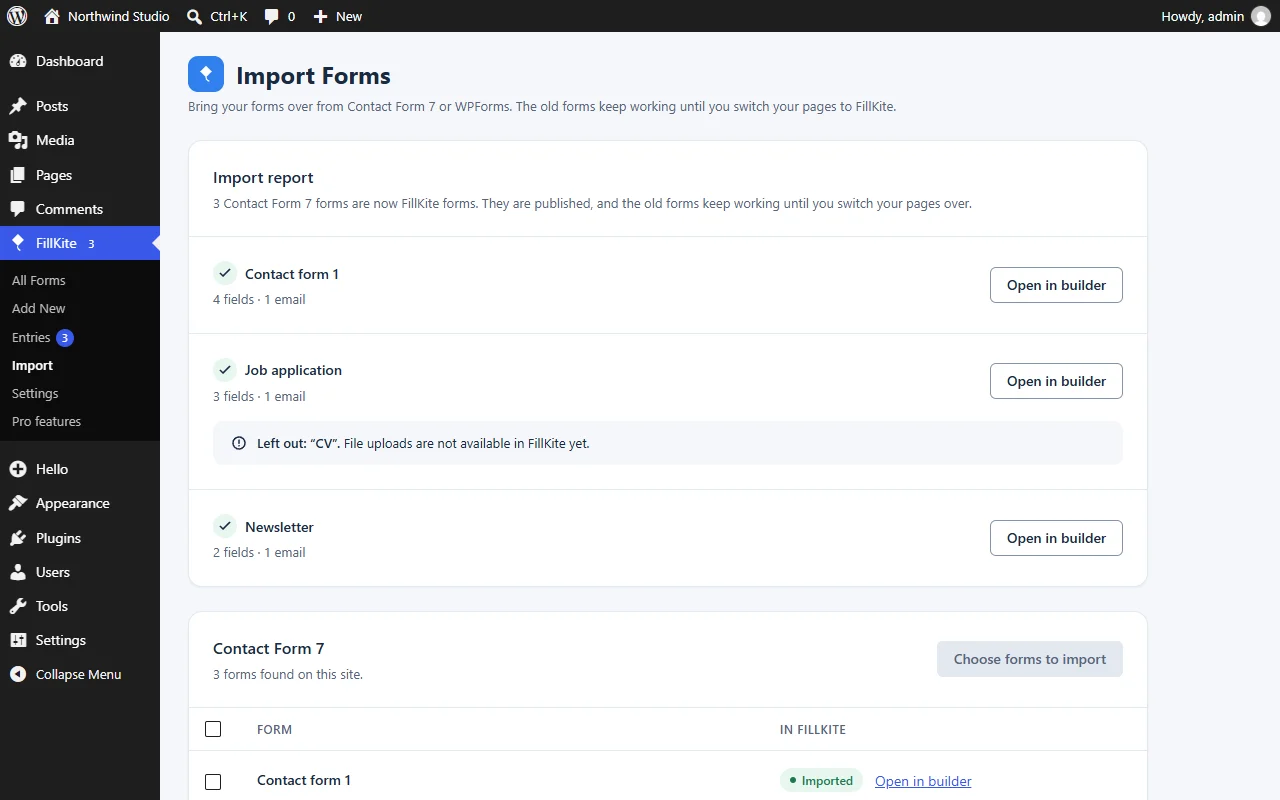
Already using Contact Form 7 or WPForms? Import your forms into FillKite and keep going. No starting from scratch.
Contact Form 7
Even when it’s switched off
WPForms
Even when it’s switched off
- Fields, choices and required settings
- Notifications and auto-replies
- Thank-you messages
- A report of anything it couldn’t bring, and why
- 1
Pick your old plugin
FillKite reads your Contact Form 7 or WPForms forms, even when that plugin is switched off.
- 2
Import and check the report
Your forms are rebuilt as FillKite forms. The report lists anything that didn’t come over.
- 3
Switch your pages
FillKite can swap the old forms on your pages. You preview every change, and each page keeps a revision.
Performance
Light by design.
A form shouldn’t slow down the page it sits on, or the pages it doesn’t sit on.
- About 11 KB of CSS and JS per form, gzipped, well under our 20 KB budget.
- Nothing loads, and no database queries run, on pages without a form.
- Spam protection starts with a honeypot and time check, with no third-party script. A CAPTCHA is optional.
Frontend assets on a page with one form
CSS + JS, gzipped
Each plugin’s own CSS and JS files on a page with one contact form, gzipped. Measured on 28 September 2026 with FillKite 1.0.12, WPForms Lite 2.0.2.1 and Fluent Forms 6.2.14. WPForms Lite and Fluent Forms also need jQuery; FillKite does not.
Pricing
Start free. Go Pro when you need more.
The free plugin covers most sites. Pro adds the extras for bigger projects, with a price lock guarantee: you renew at the price you first paid.
Free
Everything you need to build, run and track forms.
$0 forever
- Drag & drop builder, 29 field types
- Sentence-style logic and conditional emails
- Inbox with reply timer, edits and PDF
- Failed emails retried, email health check
- Mailchimp, Brevo and webhooks
- Spam protection and lead tracking
Pro
For stores, agencies and serious lead generation.
from $49 / year
- Everything in Free
- Multi-step, conversational and landing-page forms
- Polls, surveys and quizzes
- Repeater, Calculation, Products and Signature fields
- 10 payment gateways with no platform fee
- 13 email services, CRMs, Slack and Google Sheets
- Reply templates, revenue per source and reports
FAQ
Questions, answered.
Is FillKite really free?
Yes. The free version is on WordPress.org and includes 29 field types, popups, sentence-style logic, the entries inbox with its reply timer, lead quality and PDFs, notifications with built-in SMTP, Mailchimp and Brevo, spam protection, lead tracking and importers. Pro adds extras such as multi-step and conversational forms, quizzes, payments, CRMs and revenue reports.
Where do I get FillKite?
FillKite is live on WordPress.org. In your WordPress admin go to Plugins → Add New, search for FillKite and press Install Now. FillKite Pro is on sale on the pricing page.
Will FillKite slow down my site?
A form adds about 11 KB of CSS and JS, and FillKite loads it only on pages that contain a form. Pages without a form load nothing from FillKite and run no extra database queries.
What happens if a notification email fails?
The entry is always saved first. FillKite then tries the email again after 5 minutes, 30 minutes and 2 hours, marks the entry “Email not sent” with a Send again button, and warns you in the inbox and on the WordPress dashboard. Settings → Email also checks your sender domain and can send a daily test email.
Can I move my forms from Contact Form 7 or WPForms?
Yes, even when that plugin is switched off. FillKite brings over fields, choices, required settings, notifications, auto-replies and thank-you messages, and a report shows anything it couldn’t bring and why. It can then switch your pages to the new forms: you preview every change first, and each page keeps a revision you can go back to.
Does it work with Elementor and my theme?
Yes. FillKite has a native Elementor widget whose style controls start from your kit’s global colours and fonts, a Gutenberg block with a live preview, and a shortcode for anywhere else. Forms pick up your theme’s fonts, and use FillKite blue unless you set an accent colour in the form’s Design.
How does FillKite stop spam?
A hidden honeypot and a time check stop most bots with no extra step for people. You can add a per-visitor rate limit, block disposable email addresses, check that an email’s domain can receive mail, or turn on Cloudflare Turnstile, hCaptcha or reCAPTCHA v3.
Does FillKite help with GDPR?
IP addresses are stored only as a hash, entries can be deleted automatically after a number of days you choose, and spam is cleared after 30 days. You can export entries to CSV at any time, and everything stays in your own WordPress database.
Newsletter
Discounts and updates, straight to your inbox.
Get launch discounts, promotions on FillKite Pro and news about new features. A few emails a year, no spam, and you can unsubscribe any time.
We only use your email to send the newsletter. See our privacy policy.