WordPress Form Spam: 9 Proven Fixes Without a Captcha

In short:
- Most WordPress form spam comes from simple bots that fill in every field and submit in under a second. Two invisible checks, a honeypot and a time check, stop the majority of them.
- Captchas work, but they cost you real enquiries. Add one only when the invisible layers are not enough.
- A local spam score catches the human-looking spam that gets past the first layers: link-stuffed messages, pasted text, spam phrases.
- Rate limits, a duplicate flag and blocking temporary email addresses handle floods and fake sign-ups.
- Never delete spam unread for the first few weeks. Keep it in a Spam folder, check it, and mark mistakes as “Not spam”.
WordPress form spam is the tax every site pays for having a contact form. It fills your inbox, buries real enquiries, and in the worst case trains you to ignore form emails altogether, which is how genuine leads get missed.
This guide explains where WordPress form spam comes from, the nine fixes that work, in the order to apply them, and how to stop spam without putting a puzzle in front of every visitor. The advice works with any form plugin. If you are weighing a move away from a paid builder, our Gravity Forms alternative page compares spam protection and prices side by side. Where FillKite does something for you, we say so.
Where WordPress form spam comes from
Not all spam is the same, and the fix depends on the source. There are four main kinds of WordPress form spam:
| Source | What it looks like | What stops it |
|---|---|---|
| Simple bots | Every field filled, often with links, sent instantly | Honeypot and time check |
| Smarter bots | Plausible text, real-looking names, sent at human speed | Spam score, captcha |
| Floods | Dozens of entries from one address in minutes | Rate limit |
| Human spammers | SEO offers, “partnership” pitches, typed by people | Spam score, duplicate flag, your judgement |
Simple bots are by far the largest group. They crawl the web looking for any <form>, fill in every input they find, and submit. They never look at the page the way a person does, which is exactly the weakness the first two fixes use.
Fix 1: add a honeypot field
A honeypot is a form field that people never see but bots do. It is hidden with CSS and marked so screen readers skip it. A person leaves it empty because they cannot see it. A simple bot fills in every field it finds, including this one. Any entry with the honeypot filled in is spam.
A honeypot costs visitors nothing. There is no puzzle, no extra click and no third-party script. That is why it should be the first layer against WordPress form spam on every form.
In FillKite every form has a hidden honeypot built in. You do not add it or configure it. Entries it catches go to the Spam folder in the inbox, and no notification email is sent for them.
Fix 2: add a time check
People take time to fill in a form. Even a short contact form takes a few seconds: reading the labels, typing a name, writing a message. Bots submit in a fraction of a second.
A time check records when the form was loaded and compares it with when it was sent. Anything sent faster than a person could manage is treated as WordPress form spam. Like the honeypot, it is invisible and costs real visitors nothing.
FillKite runs a time check on every form alongside the honeypot. Together, these two invisible layers stop most automated spam before it reaches your inbox.
Fix 3: score each entry for spam signals
Some WordPress form spam gets past the first two layers: bots that wait before submitting, or people paid to paste the same pitch into thousands of forms. For those, a spam score looks at the content of the entry itself.
FillKite’s spam score is worked out on your own site, with no cloud service. It looks at signals such as:
- links in the message, especially several of them;
- text that was pasted rather than typed;
- long messages sent too fast to have been written;
- the same message sent again and again;
- text in a different script from your site’s language;
- common spam phrases and shouting in capitals.
Entries over the threshold go to Spam, and each one says why it was flagged. When the score gets one wrong, press Not spam in the inbox and your site learns from it. You can choose how strict the score is under Settings → Spam protection.
Fix 4: ask Akismet as well
Akismet is the spam service made by the team behind WordPress.com. It checks each submission against spam seen across millions of sites. If you already use it for comments, it can check your forms too.
When Akismet is active on your site, FillKite can ask it about each entry. If Akismet cannot be reached, the entry is kept as normal rather than lost. Note that Akismet sends entry content to its servers, so mention it in your privacy policy if you turn it on.
Fix 5: limit how often one visitor can send
A flood is WordPress form spam at speed: one address sending the same form over and over, sometimes hundreds of times an hour. Each entry may look harmless on its own, but together they bury your inbox.
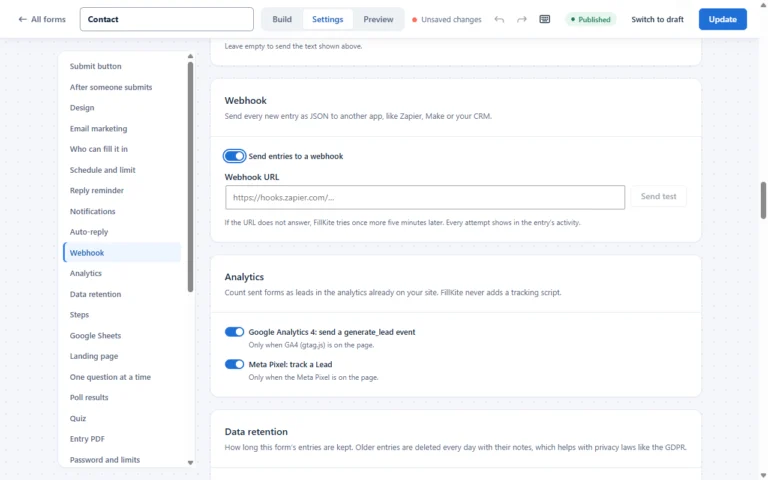
A rate limit caps how many entries one visitor can send in a number of minutes. In FillKite you set the number of submissions and the time window, for example 10 per 60 minutes. Visitors over the limit are asked to try again later, and nothing is saved.
Fix 6: flag duplicates instead of blocking them
Some repeat entries are not spam at all: a customer who pressed Send twice, or someone who wanted to add a detail. Blocking them would lose a real lead. Flagging them is safer.
FillKite’s duplicate flag marks a second entry from the same email to the same form within a number of minutes that you choose. It never blocks the entry. You simply see at a glance that it repeats an earlier one. Set it to 0 to turn it off.
Fix 7: refuse temporary email addresses
Throwaway inboxes are a favourite of people who want your download, discount or trial without ever hearing from you. They also show up in a lot of WordPress form spam, because they cost nothing to create.
On any email field in FillKite you can turn on Block temporary email addresses, which refuses addresses from a built-in list of nearly 9,000 disposable domains. A second option, Check the domain can receive email, asks your server’s DNS whether the domain has a mail server at all, which catches made-up domains.
Fix 8: add a captcha, only if you still need one
A captcha is the last layer, not the first. Every captcha adds friction, and some visitors give up rather than solve it. Invisible captchas are better, but they still load a third-party script on your page.
If the layers above are not enough for your site, FillKite supports three providers: Cloudflare Turnstile, hCaptcha and Google reCAPTCHA v3, which is invisible. Choose one under Settings → Spam protection → Captcha and paste the site key and secret key from that service. The provider’s script loads only on pages with a form.

Fix 9: review the Spam folder, do not delete it
The last fix is a habit rather than a setting. Any filter strict enough to stop WordPress form spam will occasionally catch a real person. If spam is deleted automatically, you never find out.
- Keep spam in a folder. FillKite puts caught entries in the Spam tab of the inbox, never in the bin.
- Check it once a week for the first month after you change your settings.
- Mark mistakes as Not spam, so the entry moves to the inbox and the spam score learns.
- Let old spam clear itself. FillKite removes spam entries after 30 days, so the folder never grows forever.
WordPress form spam on different kinds of forms
The same layers work everywhere, but each kind of form attracts a different kind of WordPress form spam, so the emphasis shifts.
| Form | Typical spam | Layers to lean on |
|---|---|---|
| Contact form | SEO offers, link drops, fake partnership pitches | Spam score, duplicate flag |
| Quote or enquiry form | Bots filling every field, fake budgets | Honeypot, time check, spam score |
| Newsletter sign-up | Fake or throwaway addresses, list bombing | Temporary email block, domain check, rate limit |
| Download or discount form | Throwaway inboxes to grab the file | Temporary email block |
| Job application | Mass-sent pitches from agencies | Spam score, duplicate flag |
Sign-up forms deserve a special mention. List bombing is a kind of WordPress form spam where bots sign up real people’s addresses to thousands of newsletters at once, to hide another attack in the flood of welcome emails. A rate limit and a double opt-in with your email marketing service stop your form being used this way.
How to tell whether spam is still getting through
You cannot fix what you do not measure. After you add the layers, give it a week and look at three numbers in your inbox:
- The Spam tab count. If it is rising while your inbox stays clean, the layers are working.
- Spam that reached the inbox. Any entry you had to mark as spam by hand is WordPress form spam that got through. A few a month is normal; a few a day means you need the next layer.
- Real entries in the Spam tab. If you find genuine enquiries there, lower the spam score level one step.
Each caught entry in FillKite lists the reasons it was flagged, which tells you which layer did the work. If most spam is caught by the honeypot and time check, you probably never need a captcha.
In which order should you add them?
Start with the invisible layers and add friction only when you have proof you need it. For most sites, this order stops WordPress form spam with no cost to real visitors:
- Honeypot and time check on every form (built into FillKite).
- Spam score at the normal level.
- Rate limit and duplicate flag.
- Temporary email blocking on sign-up and download forms.
- Akismet, if you already use it.
- A captcha, only if spam still gets through after two weeks.
Why a captcha first is a mistake
When WordPress form spam arrives, the first instinct is often to add a captcha. It feels decisive, and it usually works against bots. But it moves the cost of spam from you to your visitors, including the ones who were about to become customers.
Visual puzzles are hard on people with low vision, on older visitors, and on anyone using a phone in bright light. Audio alternatives are harder still. Invisible captchas avoid the puzzle, but they load a script from another company on your page, which affects privacy notices and page speed. The invisible layers in this guide stop most spam without any of that.
Spam versus low-quality leads
Not every weak entry is WordPress form spam. A student asking for free advice, a supplier pitching a service, or a real person who typed a fake phone number are not bots, and treating them as spam can hide a pattern you should know about.
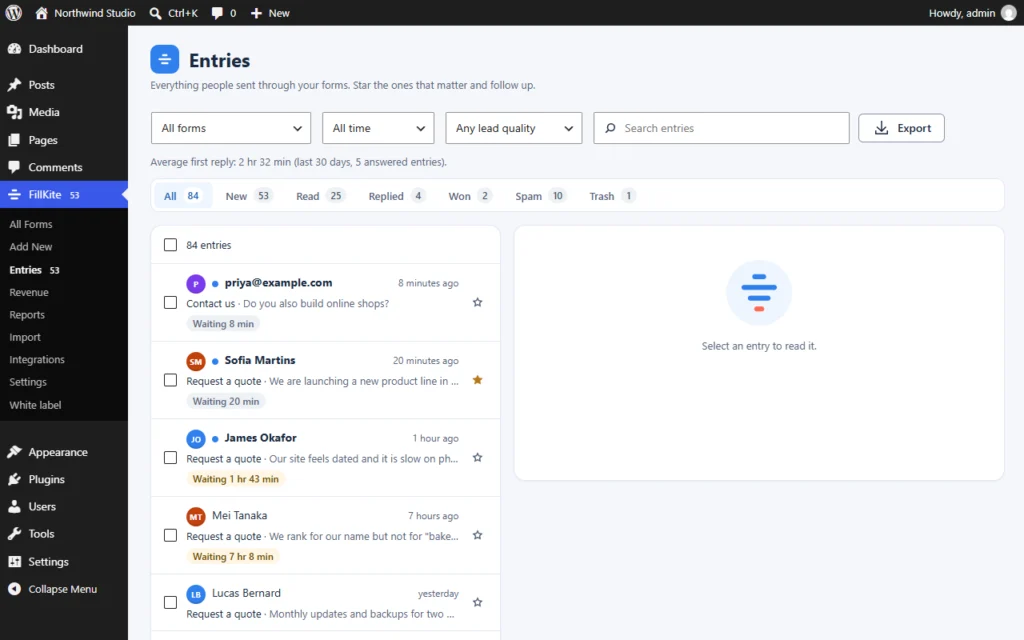
FillKite keeps the two apart. Spam goes to the Spam tab. Everything else stays in the inbox with a Lead quality badge, High, Medium or Low, worked out from signals such as whether the email domain can receive mail, a company or free mailbox, a disposable address, duplicates and how many questions were answered. You can filter the inbox to see the best leads first, and deal with the rest when you have time.
This split matters because the fixes are different. WordPress form spam needs filtering; low-quality leads need a better form. If many Low entries come from one page, the form on that page may be asking the wrong questions, or promising something the page does not.
Where this goes wrong
| Mistake | What happens | Do this instead |
|---|---|---|
| Deleting spam automatically | Real enquiries caught by mistake disappear | Keep a Spam folder and check it |
| Sending emails for spam entries | Your inbox fills anyway | No notifications for entries marked Spam |
| Captcha on every form from day one | Fewer real enquiries | Invisible layers first |
| Blocking every repeat entry | A customer who clicked twice is lost | Flag duplicates, do not block |
| Showing bots an error | Bots adapt and try again | Show the normal success message |
| Blocking whole countries | Real customers abroad cannot reach you | Score content, not location |
The fifth row is easy to miss. FillKite shows a bot the same success message a person sees, while quietly filing the entry as spam. A bot that is told it failed simply changes tactics; a bot that thinks it succeeded moves on.
A quick checklist
- Every form has a honeypot and a time check.
- A spam score runs on your own server, with a Not spam button that teaches it.
- A rate limit is set, and duplicates are flagged rather than blocked.
- Download and sign-up forms refuse temporary email addresses.
- Spam entries send no emails and are kept in their own folder.
- A captcha is added only if WordPress form spam still gets through.
If your forms route enquiries to different people, our guide to WordPress conditional logic shows how to keep each form short. Spam is only half of the inbox problem. If real enquiries are not reaching you either, read our guide to fixing a form not sending email. And if you are moving away from an older plugin, you can import Contact Form 7 forms and get every layer above at once.
Frequently asked questions
How do I stop WordPress form spam without a captcha?
Use a honeypot and a time check first, then a spam score, a rate limit and temporary email blocking. Together these stop most spam with nothing for visitors to solve. FillKite has the first two built into every form.
Why am I suddenly getting so much form spam?
Usually because a bot has found your form and added it to a list. Once that happens, the volume rises quickly. The invisible layers in this guide stop most of it within a day.
Does a honeypot hurt accessibility?
Not when it is done properly. The field is hidden from sight and from screen readers, so no visitor ever meets it. FillKite’s honeypot is built that way.
Do spam entries count towards any limit?
Not in FillKite. There is no limit on forms or entries in the free plugin, and spam entries are removed automatically after 30 days.
Can WordPress form spam harm my site?
Spam entries themselves are usually harmless text, but they waste time and can hide real leads. Links in spam messages can be phishing, so never click them. Forms that send an auto-reply can also be abused to send email to strangers, which a rate limit prevents.
Should I block form spam by country?
Rarely. It blocks real customers along with the spam, and spammers use servers everywhere. Scoring the content of each entry is more accurate.
Stop WordPress form spam without puzzles. Every FillKite form has a honeypot and time check built in, with a local spam score, rate limit and optional captcha on top. Read the spam protection guide, see every feature, or install FillKite free from WordPress.org.