WordPress Feedback Form: 8 Essential Questions to Ask
In short:
- A WordPress feedback form collects opinions from customers or visitors: how satisfied they are, what worked, and what to improve.
- Keep it short. One rating question plus one or two open questions gets more honest answers than a long survey.
- Eight essential questions cover most needs, from an overall rating to “What almost stopped you?”. Pick the three or four that match your goal.
- Use the right field type: a star rating for satisfaction, a 0–10 scale for likelihood to recommend, open text for the “why”.
- FillKite has a ready-made Feedback template and free Rating, Net Promoter Score, Likert and ranking fields.
A WordPress feedback form is the cheapest research you will ever do. Your customers already know what you do well and where you let them down; a short form at the right moment is often all it takes for them to tell you.
This guide covers when to ask for feedback, the eight essential questions and how to phrase them, which field type suits each question, how to build the form in WordPress, and what to do with the answers. The examples use FillKite, which includes a Feedback template.
When to ask for feedback
Timing decides how many people answer and how accurate their answers are. Ask when the experience is fresh:
| Moment | What to ask about |
|---|---|
| Right after a purchase | How easy it was to buy |
| After delivery or a completed project | Quality and service |
| After a support conversation | Whether the problem was solved |
| After an event or course | Content, speakers and organisation |
| On the website itself | Whether people found what they came for |
Send the link by email or put a WordPress feedback form on a thank-you page. A form buried in a footer rarely gets answers.
8 essential questions for a WordPress feedback form
1. “How would you rate your experience overall?”
A five-star rating. Simple, familiar, and quick to compare over time. Use FillKite’s Rating field.
2. “How likely are you to recommend us to a friend or colleague?”
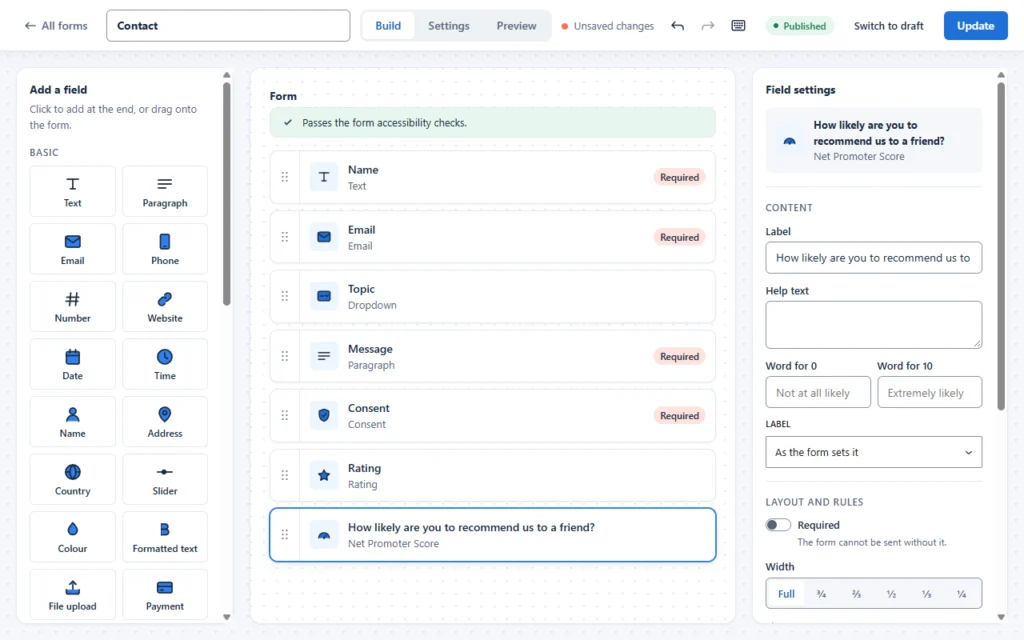
A 0–10 scale, the basis of Net Promoter Score (NPS). People answering 9 or 10 are promoters, 0 to 6 detractors. FillKite has a Net Promoter Score field with labels you can change for each end of the scale.
3. “What went well?”
Open text. It tells you what to keep doing, and often gives you words for your marketing, with permission.
4. “What could we do better?”
Open text, and the most valuable question on the form. Phrase it as an invitation, not a complaint box.
5. “Did you find what you were looking for?”
Yes, partly or no. Best for a WordPress feedback form on your website, to spot pages that disappoint.
6. “How easy was it to…?”
A scale from very difficult to very easy, for a specific task such as ordering, booking or finding a price. A Likert field works well here.
7. “What almost stopped you from buying?”
Open text for new customers. It reveals the doubts your website should answer better.
8. “May we contact you about your answers?”
A yes/no choice, followed by an email field shown only when they say yes, using conditional logic. It keeps the form anonymous for people who prefer it.
Write neutral questions
The wording of a question can decide the answer. Leading questions make a WordPress feedback form feel like a sales pitch and give you flattering but useless data.
| Leading | Neutral |
|---|---|
| How much did you enjoy our excellent service? | How would you rate our service? |
| Wasn’t our checkout easy? | How easy was our checkout? |
| What did you love about the course? | What was most useful in the course? |
| Would you agree we reply quickly? | How satisfied were you with our reply time? |
Read each question aloud and ask whether it hints at the answer you want. If it does, rewrite it.
Pick three or four, not eight
Each question you add lowers the number of people who finish. For most businesses, a WordPress feedback form with these three works best:
- An overall rating (question 1 or 2).
- “What went well?”
- “What could we do better?”
Add question 8 if you want to follow up, and one of the others only when you have a specific thing to learn.
Put the questions in the right order
Order changes answers too. Start with the easiest question, usually a rating, so people begin with a single tap. Put open questions after it, when they have already started. Ask about the specific experience before general loyalty, because a question about recommending you colours the answers that follow. And leave optional contact details for the very end, so the WordPress feedback form feels anonymous until the person decides otherwise.
Choose the right field for each question
| Question type | FillKite field | Why |
|---|---|---|
| Overall satisfaction | Rating | Familiar stars, one tap |
| Likelihood to recommend | Net Promoter Score | The standard 0–10 scale |
| Agreement with statements | Likert scale | Consistent answers across several statements |
| Rating several items at once | Checkbox grid | Compact for many rows |
| What matters most | Ranking | Forces a choice between priorities |
| The “why” | Paragraph | Room for honest detail |
All of these are free in FillKite, which includes 29 field types without Pro.
WordPress feedback form examples
After a purchase
- How easy was it to place your order? (Very difficult → Very easy)
- What almost stopped you from buying?
- Anything else we should know?
After a project or service
- How would you rate our work overall? (1–5 stars)
- How likely are you to recommend us? (0–10)
- What went well?
- What could we do better?
After an event or course
- How useful was the session? (1–5 stars)
- Rate each part: content, speaker, venue, organisation (checkbox grid or Likert)
- What topic should we cover next?
On the website
- Did you find what you were looking for? (Yes, partly, no)
- What were you looking for? (shown only when the answer is “partly” or “no”)
Each WordPress feedback form above stays under five questions and ends with an open question, where the most useful answers usually appear.
How to calculate your NPS
If you include the 0–10 recommendation question, you can calculate a Net Promoter Score, a method developed by Bain & Company:
- Count promoters (answers of 9 or 10) and detractors (0 to 6).
- Work out each as a percentage of all answers.
- Subtract the detractor percentage from the promoter percentage.
The result runs from −100 to +100. Export your WordPress feedback form entries to Excel each month and track the score over time; the trend matters more than any single number.
How to build a WordPress feedback form in FillKite
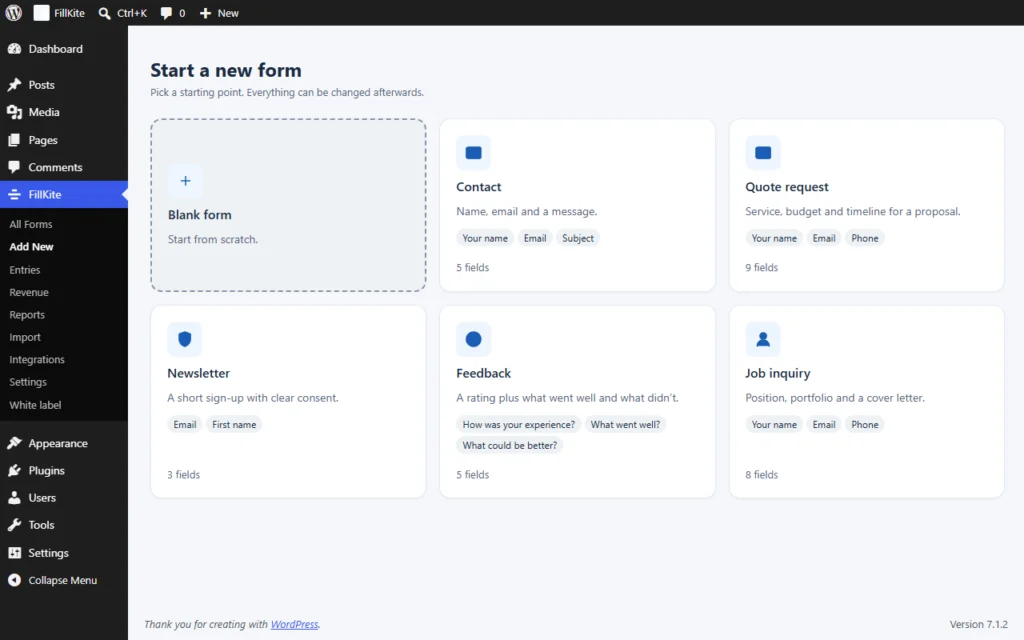
- Go to FillKite → Add New and choose the Feedback template: a rating plus what went well and what didn’t.
- Adjust the questions to your business, and add a Net Promoter Score field if you track NPS.
- Decide whether name and email are needed. For honest answers, make them optional or leave them out.
- In the form’s Settings tab, set a short thank-you message and turn off notifications if you prefer to review answers weekly.
- Place the form on a page, a thank-you page or in a popup, and send the link to customers.
Where to place a WordPress feedback form
- A link in a follow-up email. The most common and effective option. Send it a day or two after delivery, while the experience is fresh.
- On the thank-you page after an order or booking, for questions about the buying process itself.
- In a popup from a small button, for website feedback, so the form does not take space until someone wants it.
- Inside your page builder layout. With Elementor, place it with the FillKite Form widget; see our guide to the Elementor contact form for how the widget works.
Getting more responses
Most people will not fill in a WordPress feedback form unless you make it easy and worth their while:
- Say how long it takes: “Three questions, under a minute.”
- Say why you are asking: “We read every answer and use it to improve.”
- Ask once. One reminder at most; repeated requests annoy.
- Make the first question a tap, such as a star rating, so starting is effortless.
- Thank them, and, when you change something because of feedback, tell your customers.
Incentives such as a discount can raise response rates, but they can also bring rushed answers. If you offer one, keep it small and give it to everyone who answers, whatever they say.
Keep the answers clean
Any public form attracts bots, and a WordPress feedback form is no exception. Spam answers distort your averages and waste reading time. Keep the same protection you use on other forms: FillKite puts a hidden honeypot and a time check on every form and files caught entries in a separate Spam tab, so your ratings and averages come only from real people. Our guide to WordPress form spam explains the other layers if you ever need them.
Also watch for accidental duplicates: someone pressing Send twice gives one opinion double weight. FillKite flags a second entry from the same email within a few minutes, so you can spot and remove it.
Anonymous or named?
Anonymous feedback is usually more honest, especially about problems. Named feedback lets you follow up and fix things for that person. A good compromise, and a common pattern for a WordPress feedback form, is question 8 above: anonymous by default, with an optional email for people who want a reply. FillKite stores IP addresses only as a hash, so even anonymous answers do not keep raw visitor addresses.
Business customers versus consumers
A WordPress feedback form for business clients can ask a little more, because the relationship is longer and the answers shape a bigger account. A question about the reply time of your account manager, or about invoicing, makes sense there. For consumers, keep it lighter and faster: one rating, one open question and a thank-you. In both cases, the person answering is doing you a favour, so respect their time.
On phones
Most people will open a feedback link from an email on their phone. Star ratings and 0–10 scales must be easy to tap, open-text boxes should be comfortable to type in, and the form should fit the screen without sideways scrolling. FillKite’s rating and scale fields are built for touch, and fields stack automatically on narrow screens.
Do something with the answers
Feedback that nobody reads is worse than no feedback, because customers notice when nothing changes. A simple routine:
- Weekly: read every open-text answer. Mark each entry Read in the inbox.
- Monthly: export the entries as CSV or Excel and look at the average rating and NPS over time.
- Every quarter: list the three most common complaints, fix one, and tell customers you did.
Reply personally to low scores where people left an email. A quick, genuine reply often turns a detractor into a loyal customer.
Compare like with like
When you look at results over time, keep the questions the same. Changing the wording of the rating question, or moving it to a different place in the form, can shift answers enough to look like a real change in customer mood. Decide on your core questions, keep them stable for at least a year, and experiment only with the optional ones. That way a drop in the average really means something happened, and you can look for the cause.
Share the results with the team
Feedback belongs to everyone who serves customers, not just whoever set up the form. Once a month, share a short summary: the average rating, the NPS, three quotes that stood out and one thing you will change. Keep the full WordPress feedback form entries in one inbox, so anyone who needs the detail can read it. A team that hears what customers say is quicker to fix problems than one that only sees a score.
Turning feedback into testimonials
Happy customers often write the best marketing copy you will ever get. If someone leaves a glowing answer to “What went well?”, ask whether you may quote them, and how they would like to be named. Never publish feedback without permission. A separate optional checkbox on the WordPress feedback form, “You may quote my answer on your website”, makes this easy and keeps consent clear.
Handling negative feedback
Low scores are the most useful answers on a WordPress feedback form, even when they sting. Thank the person, avoid arguing, and look for the fixable part. If they left an email, reply within a day with what you will do. Many unhappy customers only want to be heard; a fast, human reply often changes how they feel about your business, and about recommending you. Track complaints by theme in a simple list, so repeated problems become visible instead of disappearing among individual entries.
Privacy
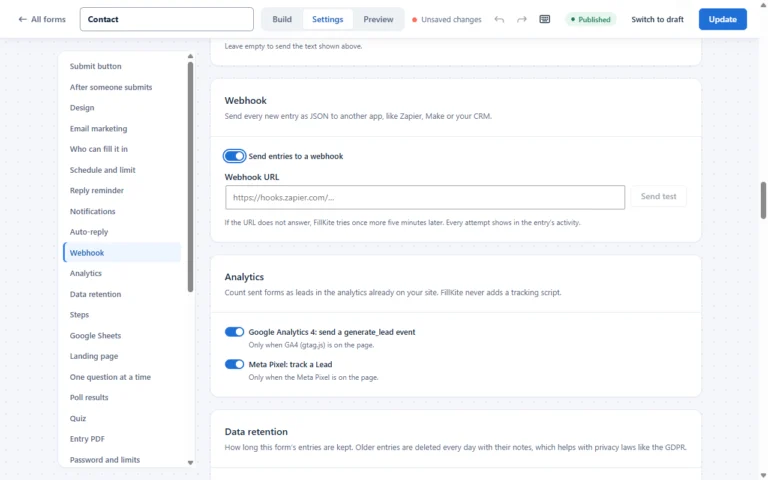
Even an anonymous form can collect personal data in open-text answers. Keep entries only as long as you need them, and set a retention period so old answers are deleted automatically. Our guide to the GDPR contact form covers retention and consent for any form, including feedback.
A WordPress feedback form checklist
- Three or four questions, with one rating and at least one open question.
- Neutral wording that does not push for a positive answer.
- Contact details optional, with an email field shown only when wanted.
- Sent while the experience is fresh.
- Answers read weekly and summarised monthly.
- One improvement made each quarter, and customers told about it.
Where a WordPress feedback form goes wrong
| Mistake | What happens | Do this instead |
|---|---|---|
| Twenty questions | Few people finish | Three or four questions |
| Leading questions | Answers you want, not the truth | Neutral wording |
| Required name and email | Less honest answers | Optional contact details |
| Asking weeks later | Vague memories | Ask while it is fresh |
| Never acting on answers | Customers stop answering | Fix something and say so |
| Only star ratings | You know the score, not the reason | Add “what could be better?” |
Frequently asked questions
How many questions should a WordPress feedback form have?
Three or four is ideal: an overall rating and one or two open questions. Add more only when you have a specific question to answer.
Should I use stars or NPS?
Stars for satisfaction with a specific experience; NPS for overall loyalty. Many businesses use one of each.
Can I show the feedback form in a popup?
Yes. FillKite forms can open from a button in a popup, so you can place a small “Give feedback” button without adding a full form to the page.
How often should I send a feedback request?
Once per experience: after each project, order or event. Avoid asking the same customer more than every few months for general feedback, or answers will drop off.
Can I get notified of low ratings straight away?
Yes. In FillKite, give a notification a rule, such as “send when Rating is less than 3”, so you hear about unhappy customers immediately and can reply the same day.
Is the feedback template free?
Yes. The Feedback template and the Rating, Net Promoter Score, Likert, checkbox grid and ranking fields are all part of the free plugin.
Ask better questions, get better answers. FillKite’s Feedback template, rating and NPS fields and entries inbox make it easy to collect feedback and act on it. Browse the form templates, see the field types, or install FillKite free from WordPress.org.