GDPR Contact Form: 8 Essential Rules for WordPress

In short:
- A GDPR contact form collects only the data it needs, says clearly why, keeps it only as long as necessary, and stores it securely.
- You do not always need a consent checkbox. Replying to an enquiry is usually covered by the person’s request itself; consent matters for extra uses such as marketing.
- Never pre-tick a box, never bundle marketing consent with sending the form, and always link to your privacy policy.
- Keep proof of consent where you rely on it: the wording shown, the time and the page.
- FillKite keeps entries in your own database, stores IP addresses only as a hash, can delete old entries automatically, and saves a consent receipt for every ticked box.
A GDPR contact form is a normal contact form built so that it respects the EU’s General Data Protection Regulation, and the UK’s version of it. That sounds heavy, but for a typical business site it comes down to eight practical rules.
This guide explains those rules in plain English, what a GDPR contact form should and should not ask, when you need a consent checkbox, and how to set retention and consent records in WordPress. It is practical guidance, not legal advice; for your specific situation, check with a qualified adviser.
Does GDPR apply to your contact form?
If your site receives enquiries from people in the EU or the UK, the answer is usually yes. A contact form collects personal data: at least a name and an email address, often a phone number and a message that may contain more. Collecting and storing that data is “processing” under GDPR, and the rules apply whether you run a large company or a one-person business.
The good news is that a GDPR contact form does not need to be complicated. Most of the work is deciding what you really need, and saying honestly what you do with it.
8 essential rules for a GDPR contact form
1. Ask only for what you need
This is the principle of data minimisation. If you reply by email, you need an email address and a message. A name helps. A phone number, company, address or date of birth are extra data that you must justify. Every field you remove makes your GDPR contact form simpler and, usually, easier to fill in.
2. Say why you collect it
Next to the form, one or two plain sentences are enough: “We use these details to reply to your message. See our privacy policy.” Link to a privacy policy that explains who you are, what you collect, why, how long you keep it, and people’s rights.
3. Choose the right legal basis
GDPR requires a lawful basis for every use of personal data. For answering an enquiry, the basis is usually the person’s request, taking steps they asked for, or your legitimate interest in replying. You do not need separate consent just to answer the message they sent you.
4. Use consent properly, when you use it
Consent becomes necessary for extra uses, such as adding someone to a newsletter. Under Article 7 of the GDPR, consent must be freely given, specific, informed and unambiguous. In practice: an unticked box, a clear sentence saying what they agree to, and no penalty for saying no.
5. Never bundle or pre-tick
A GDPR contact form must not make marketing consent a condition of sending the message. “I agree to the privacy policy and to receive offers” in one required box is not valid consent. Split them: the form works without the marketing box, and the marketing box starts unticked.
6. Keep data only as long as needed
Decide how long you keep enquiries. A common approach is a year or two for general enquiries, longer only if they become customers and you need the records. Then delete old entries automatically, so you do not rely on remembering.
7. Store it securely
Keep entries somewhere you control, limit who can see them, and avoid copying personal data into places you forget about. Emailing every entry to five people creates five copies in five inboxes.
8. Be ready for requests
People can ask what you hold about them, ask you to correct it, or ask you to delete it. You should be able to find their entries, export them and delete them within a month.
A GDPR contact form example
Here is a simple GDPR contact form for a small business that replies by email and sends an occasional newsletter:
| Field | Required? | Why |
|---|---|---|
| Name | Yes | To address the reply |
| Yes | To send the reply | |
| Message | Yes | The enquiry itself |
| Phone | No | Only for people who prefer a call |
| “Send me the monthly newsletter” | No, unticked | Separate consent for marketing |
Under the form, one line: “We use these details to reply to your message and never share them. See our privacy policy.” That GDPR contact form asks for three pieces of data, explains why, and keeps marketing as a genuine choice.
If you need more details from some visitors only, such as an order number for support questions, show those fields with conditional logic instead of asking everyone. Fewer people are asked for data they do not need to give.
Do you need a consent checkbox?
This is the most common question about a GDPR contact form, and the answer surprises people: often not, for the enquiry itself. What matters is what you do with the data.
| What you do with the entry | Consent checkbox needed? |
|---|---|
| Reply to the enquiry | Usually no; the request itself is the basis |
| Send a quote they asked for | Usually no |
| Add them to your newsletter | Yes, a separate, unticked box |
| Share details with a partner | Yes, and name who |
| Collect health or other special data | Yes, with extra care; take advice |
Many businesses still add a short consent or acknowledgement line for clarity, such as “I agree that you may use these details to reply to me, as described in the privacy policy.” That is fine, as long as it is honest about what it covers and marketing is handled separately.
Keep proof of consent
Where you rely on consent, you must be able to show it was given. That means recording what the person saw and when. A GDPR contact form that only stores “yes” cannot prove what the text said on the day.
FillKite saves a consent receipt with every ticked Consent field: the exact wording, its version, the time and the page, sealed so that a later change shows. Open the entry and press Print consent receipt when you need proof. If you change the wording later, older entries still show the version each person agreed to.
Set a retention period
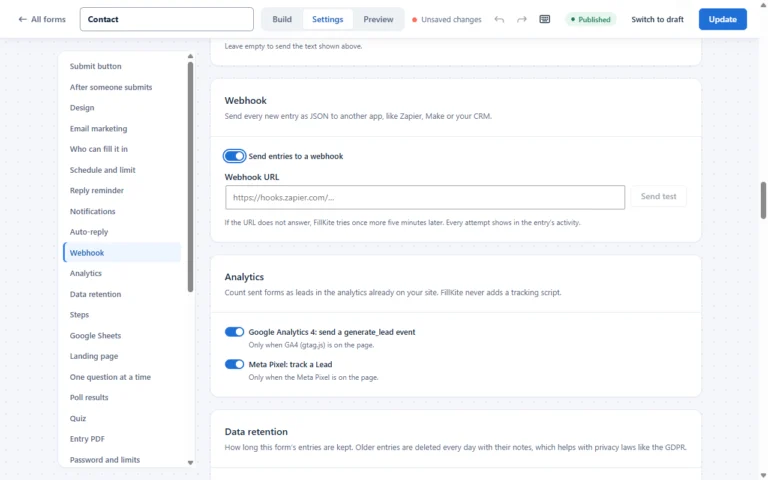
Deleting old data is the rule people most often forget. In FillKite, each form has a Data retention setting: keep entries forever, or delete them automatically after a number of days. Older entries are deleted every day with their notes. Spam is always deleted after 30 days.
Pick a period that matches your privacy policy, and set it on every form. Your GDPR contact form then cleans up after itself.

Security in practice
- Keep entries in your own database. FillKite stores forms and entries in your WordPress database and sends nothing to FillKite.
- Hash IP addresses. FillKite stores IP addresses only as a hash, so spam protection works without keeping the raw address.
- Limit access. Under Settings → Access, give colleagues an entries-only role, or none at all.
- Keep answers out of auto-replies. An auto-reply that repeats the whole message sends personal data to an address that might be mistyped. FillKite’s default auto-reply does not include the answers.
- Use HTTPS on every page with a form.
When you stop using a form plugin
Data does not disappear when you deactivate a plugin. Entries usually stay in the database until someone removes them, which can quietly break your retention promise. Before you switch tools, export what you still need, then delete the rest on purpose. In FillKite, your data stays when you delete the plugin unless you turn on Delete all FillKite data when the plugin is deleted under Settings → Data, so the choice is yours and explicit.
Third-party services on your form
Every service that touches your form’s data should appear in your privacy policy. Common ones:
- Captchas such as Google reCAPTCHA load a script from another company and send it data about the visitor. Invisible spam protection, such as a honeypot and time check, avoids that. See our guide to WordPress form spam.
- Spam services such as Akismet receive the content of entries.
- Email marketing tools receive subscribers’ details, and need their own consent.
- Your email provider carries every notification.
- Analytics tools, if forms send conversion events to them.
FillKite’s lead tracking saves campaign tags with entries without cookies, and its spam score runs on your own server, which keeps the list of third parties short.
The hidden copies: email notifications
A GDPR contact form usually does two things with each entry: stores it, and emails it. The email copy is easy to forget. It sits in inboxes, gets forwarded, and is rarely deleted when the stored entry is. When someone asks you to erase their data, both copies count.
Three habits keep this under control. Send notifications only to the people who act on them. Keep notification emails short, with a link to the entry rather than every answer where that works for you. And when you delete an entry on request, search your mailbox for the same person and delete those emails too. Keeping one authoritative copy in your form inbox, with a retention period, makes the whole GDPR contact form easier to manage.
Your email route matters as well: notifications should go through your own mail provider, not an unknown server. Our guide to SPF DKIM DMARC explains how to make sure they do.
Handling access and deletion requests
When someone asks what you hold, search your inbox for their email address. In FillKite, search every answer in Entries, then export the matching entries as CSV or PDF for the person. To delete, move the entries to the trash and delete them permanently from the Trash tab. Remember to delete copies in email inboxes too.
Newsletter sign-ups done right
The newsletter box is where most GDPR contact form mistakes happen, because it mixes two purposes. Keep them apart:
- the enquiry is sent whether or not the box is ticked;
- the box is unticked by default and says exactly what they will receive and how often;
- only people who ticked it are sent to your email marketing tool;
- every newsletter has an unsubscribe link, and unsubscribing is as easy as subscribing.
Many email marketing services also offer double opt-in, where the subscriber confirms by clicking a link in an email. It is not strictly required everywhere, but it is strong proof of consent and keeps fake addresses off your list.
UK GDPR and laws outside Europe
The UK has its own version of the GDPR, which works in almost the same way, alongside rules on electronic marketing. Other places have their own privacy laws with similar ideas: collect what you need, tell people why, keep it safe, respect their choices. A well-built GDPR contact form is a good baseline almost everywhere, though specific laws differ, so check the rules where your customers are.
Sensitive and children’s data
Some forms touch data that needs extra care: health details on a clinic’s enquiry form, or information about children for a school or club. Special categories of data have stricter rules, and children cannot always give consent themselves. If your GDPR contact form collects either, keep the fields to the minimum, restrict who can see entries, set a short retention period, and take professional advice before you go live.
A GDPR contact form checklist
- Every field has a clear purpose; optional fields are marked optional.
- A short notice and a privacy policy link sit next to the form.
- Marketing consent is separate, optional and unticked.
- Proof of consent is stored where you rely on it.
- A retention period is set and applied automatically.
- Entries are stored in a place you control, with limited access.
- Third parties on the form are listed in the privacy policy.
- You can find, export and delete a person’s entries on request.
Where a GDPR contact form goes wrong
| Mistake | Why it is a problem | Do this instead |
|---|---|---|
| Pre-ticked consent box | Not valid consent | Always unticked |
| Newsletter consent bundled with sending | Consent is not freely given | A separate, optional box |
| Asking for data “just in case” | Breaks data minimisation | Remove fields you do not use |
| Keeping entries forever | No retention justification | Set automatic deletion |
| No link to a privacy policy | People are not informed | Link right next to the form |
| Full answers in auto-replies | Personal data sent to possibly wrong addresses | Short confirmation only |
| No proof of consent | You cannot show what was agreed | Store wording, version, time and page |
Frequently asked questions
Is a consent checkbox required on every GDPR contact form?
No. Replying to an enquiry is usually covered by the request itself or legitimate interest. You need consent for extra uses, such as marketing, and then it must be a separate, unticked box.
What should the privacy notice next to the form say?
Briefly what you use the details for, and a link to your full privacy policy. For example: “We use these details to reply to your message. See our privacy policy.”
How long can I keep contact form entries?
As long as you need them for the purpose you stated, and no longer. Many businesses choose one or two years for general enquiries. Set it on each form and delete older entries automatically.
Can I store the visitor’s IP address?
You can if you have a reason, such as spam protection, and say so in your privacy policy. Storing only a hash of the address, as FillKite does, lets you spot repeat abuse without keeping the raw IP.
Should the consent text be required?
Only if sending the form truly depends on it. A marketing box must always be optional. An acknowledgement of your privacy policy can be required, but it must not hide marketing consent inside it.
Do I need to encrypt contact form entries?
GDPR asks for appropriate security rather than naming one technique. HTTPS for the form, limited access to entries, a secure hosting account and regular updates are the basics. Keep entries out of places you cannot control.
Can I use a GDPR contact form without a privacy policy?
No. People must be told how their data is used, and the privacy policy is where that lives. A short notice next to the form should link to it.
Does a GDPR contact form need a captcha?
No, and a third-party captcha adds another company that processes visitor data. Invisible protection such as a honeypot and time check stops most spam without it.
Build a GDPR contact form without the guesswork. FillKite keeps entries in your own database, hashes IP addresses, deletes old entries on schedule and saves a consent receipt for every ticked box. Read about privacy and data, see every feature, or install FillKite free from WordPress.org.