Lead Response Time: 7 Proven Ways to Reply Faster
In short:
- Lead response time is how long it takes you to reply to a new enquiry. For most small businesses it is measured in hours or days; the best reply in minutes.
- Research published in Harvard Business Review found that firms contacting a lead within an hour were nearly seven times as likely to qualify it as firms that waited longer.
- Slow replies are rarely laziness. They come from enquiries that arrive in the wrong inbox, land in spam, or sit with nobody clearly responsible.
- Seven fixes: measure it, see waiting time on every lead, route each enquiry to one person, send an instant auto-reply, set reminders, reply from templates, and protect email delivery.
- FillKite shows how long every lead has waited, turns it amber after an hour and red after a day, and can email you when a lead is still unanswered.
Lead response time is the gap between a person sending your form and someone from your business replying. It is one of the few sales numbers that is fully in your control, and one of the most neglected.
This guide explains why lead response time matters so much, how to measure yours, and seven proven ways to reply faster without hiring anyone. The examples use FillKite’s lead inbox, but the ideas work with any setup.
Why lead response time matters
When someone fills in your form, they are interested right now. They may also be filling in your competitors’ forms. The first business to reply with a helpful answer usually gets the conversation, and often the job.
The best-known evidence comes from a study published in Harvard Business Review, which looked at how quickly companies responded to web leads. Firms that tried to contact a lead within an hour were nearly seven times as likely to have a meaningful conversation with a decision maker as firms that waited even an hour longer. Many companies in the study took well over a day to reply.
The exact numbers vary by industry, but the direction never does. Interest fades quickly, and every hour of lead response time gives it more room to fade.
What is a good lead response time?
There is no single target, because a plumber’s emergency enquiry and a request for a website quote are different things. As a practical guide:
| Lead response time | What it usually means |
|---|---|
| Under 15 minutes | Excellent. You are almost always first. |
| Under 1 hour | Very good. The lead is still warm. |
| Same working day | Acceptable for considered purchases. |
| Next day | You are probably not first any more. |
| Two days or more | Many leads have moved on or forgotten you. |
If you do not know your own lead response time, that is the first thing to fix. You cannot improve a number you never see.
Why replies are slow
In small businesses, a slow lead response time is almost never because nobody cares. It is usually one of these:
- The enquiry is in the wrong place. It went to an old address, a shared inbox, or someone on holiday.
- The email never arrived. It landed in spam, or the website failed to send it.
- Nobody owns it. Everyone saw it and assumed someone else would answer.
- It got buried. Among newsletters, invoices and spam, one enquiry is easy to miss.
- Answering takes too long. Writing each reply from scratch pushes it to “later”.
Each of the seven fixes below removes one of these causes.
Fix 1: Measure your lead response time
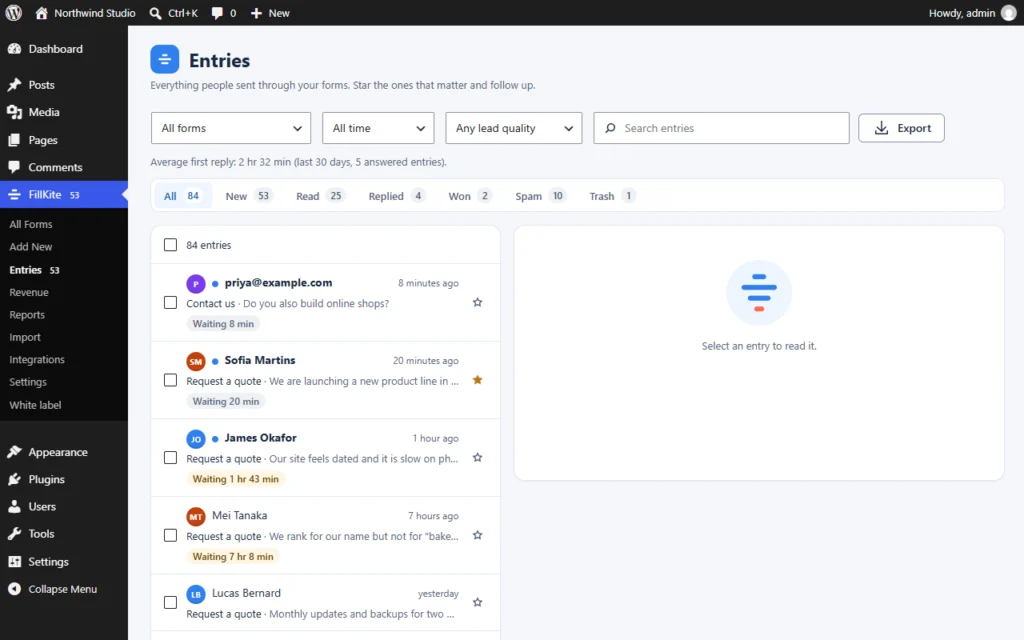
Start by seeing the number. In FillKite, every entry in the inbox shows Waiting and the time since it arrived until someone marks it as replied. Answered entries show Replied in and how long it took. The top of the inbox shows your average first-reply time for the last 30 days.
Look at that average once a week. It is the single most useful measure of how well your website turns interest into conversations, and it moves quickly once you start watching it.
Fix 2: Make waiting time impossible to miss
A number in a report is easy to ignore. A lead that visibly turns amber is not. FillKite’s reply timer changes colour as a lead waits: neutral at first, amber after an hour, red after a day. You can see at a glance which leads need attention now.
Sort your day around it. Start with red, then amber, then everything else. It sounds simple, but it changes lead response time more than any other habit, because it stops the oldest enquiries from being the easiest to put off.
Fix 3: Send each enquiry to one person
“Everyone gets the notification” often means nobody replies. Give every kind of enquiry an owner.
In FillKite, a form can have up to 10 notifications, and each one can have its own rules. Send sales questions to the person who handles sales and support questions to support, based on what the visitor picked in the form. Add CC only where someone genuinely needs to see it. If you have a team, give people an entries-only role under Settings → Access so they can answer leads without touching form settings.
Fix 4: Reply instantly with an auto-reply
An auto-reply is not a real answer, but it cuts the perceived lead response time to zero. The visitor knows the message arrived, who will reply, and roughly when. That alone stops many people from filling in the next company’s form.
A good auto-reply is short: thank them, repeat what they asked for, say when they will hear back, and give one useful link. In FillKite, turn on Send an auto-reply in the form’s Settings tab, choose the email field it goes to, and write the subject and message. You can use merge tags such as the person’s name.
Here is an example you can adapt:
Hi {first name}, thanks for your message about {topic}. We have it, and one of our team will reply within two working hours, by email from [email protected]. If it is urgent, call us on 020 0000 0000. In the meantime, our pricing page answers the most common questions.
It sets an expectation you can meet, names the address the reply will come from so it is not missed, and offers a faster route for urgent cases. That clarity is worth as much as shaving minutes off your lead response time.
Fix 5: Set reply reminders
Even with a visible timer, busy days happen. A reminder catches the leads that slip through.
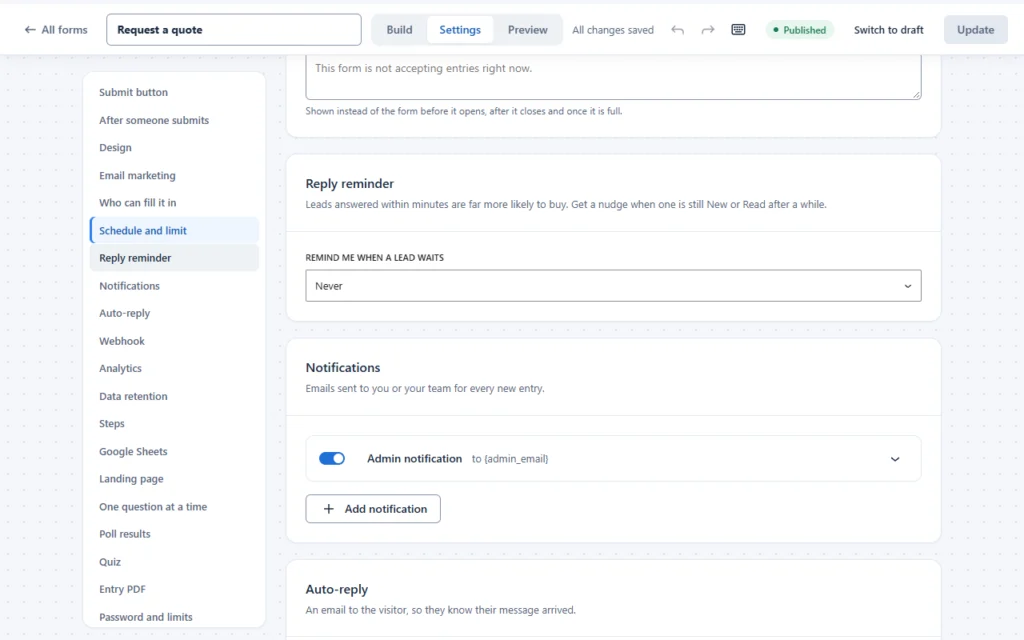
In each form’s Settings tab, FillKite has a Reply reminder: choose to be reminded when a lead has waited 15 minutes, 1 hour, 4 hours or 1 day. If the entry is still not marked as replied by then, you get an email. Set it to match the promise in your auto-reply, so you never break it.
Fix 6: Reply from a template, then personalise
Writing every reply from scratch is slow, and slow replies get postponed. Keep three or four saved replies for your most common enquiries, then add one or two personal sentences to each.
A useful structure for a first reply:
- Thank them by name and repeat what they asked for.
- Answer the question, or ask the one thing you need to know next.
- Offer a clear next step: a call time, a price range, a link to book.
FillKite’s Reply button on each entry opens an email to the sender, so the reply goes out from your normal mailbox. Mark the entry as Replied afterwards, and the timer stops and your average updates.
Fix 7: Make sure enquiries actually arrive
The worst lead response time is infinite: the enquiry never reached you. This happens more than most people think, usually because the website’s notification emails land in spam.
Two protections matter. First, keep every entry in WordPress, not only in email, so a failed notification never means a lost lead. FillKite saves each entry before any email is sent and retries failed notifications after 5 minutes, 30 minutes and 2 hours. Second, fix the cause. Our guides to a form not sending email and to SPF DKIM DMARC cover it step by step.
Reply to the best leads first
When several leads arrive at once, lead response time matters most for the ones most likely to buy. FillKite gives every entry a Lead quality badge, High, Medium or Low, worked out from signals such as whether the email domain can receive mail, a company or free mailbox, a disposable address, duplicates and how many questions were answered. Filter the inbox by quality and reply to High leads first.
Just as important, keep spam out of the way. Spam in the same list as real leads slows everything down. See our guide to stopping WordPress form spam, which keeps caught entries in their own tab.
Fast is good, helpful is better
Chasing lead response time can go too far. A reply in four minutes that says only “Thanks, when can we call you?” is fast, but it gives the visitor nothing. A reply in forty minutes that answers their question, gives a price range and suggests a next step usually wins.
Aim for the fastest reply that is still genuinely useful. In practice that means:
- answer the actual question if you can, even briefly;
- if you need more information, ask one clear question, not five;
- give a next step with a time attached, such as a call slot or a date for the quote.
Good forms make this easier. If the form already asks for the budget, the service and the timeline, your first reply can be specific straight away, without a round of questions. That is one reason a well-built form improves lead response time even before anyone touches the inbox.
Where this goes wrong
| Mistake | Effect on lead response time | Do this instead |
|---|---|---|
| Notifications to a shared inbox | Everyone assumes someone else replied | One owner per kind of enquiry |
| Leads only in email | Lost in the inbox, or never arrive | Keep every entry in WordPress too |
| No auto-reply | The visitor keeps shopping around | Instant, short auto-reply with a promise |
| Promising “within 24 hours” and missing it | Trust drops before the first reply | Set a reminder shorter than your promise |
| Never marking leads as replied | You cannot see your real average | Mark Replied every time |
| Spam mixed with leads | Real enquiries are buried | Filter spam into its own folder |
Lead response time across channels
Forms are not the only way leads arrive, and visitors do not treat every channel the same. Their patience differs:
| Channel | What visitors expect | Practical target |
|---|---|---|
| Live chat | An answer while they are still on the page | Seconds to a couple of minutes |
| Phone and voicemail | A call back the same day | Within a few hours |
| Website form | An email or call soon | Within an hour on working days |
| Email to your address | A reply, but not instantly | Same working day |
| Social media messages | A reply within the day | Same day |
Website forms sit in an awkward middle: visitors expect a reasonably quick answer, but form enquiries are the easiest to overlook because they arrive silently by email. That is why lead response time on forms is often the worst of any channel, and why a visible timer makes such a difference.
Setting up a small team
With two or three people answering enquiries, lead response time depends less on speed and more on clarity. Agree three things:
- Who owns which enquiries. Match your form’s notification rules to it.
- What “replied” means. The first personal message, not the auto-reply. Mark the entry as Replied only then.
- Who covers when someone is away. Change the notification recipient before a holiday, not after.
Private notes on each entry let colleagues see what has already been said, so nobody sends a second, contradictory first reply. Stars mark the leads that matter most, so a colleague covering for you knows where to start.
Weekends, evenings and holidays
You cannot reply in minutes at 11 pm on a Saturday, and you do not need to. What matters is that the visitor knows what happens next. Put your hours in the auto-reply (“We reply within two hours on weekdays, 9 to 5”), and make Monday morning’s first job the red leads from the weekend.
If out-of-hours enquiries are valuable in your business, route them to whoever is on call with a notification rule, and keep the reply reminder short for that form only.
Holidays need one more step. Before you leave, change the auto-reply to say when you are back and who to contact meanwhile, and point the notification at a colleague. When you return, reset both the same morning.
A five-minute weekly review
Once a week, look at three things:
- your average first-reply time, compared with last week;
- any leads that waited more than a day, and why;
- how many leads were marked Won, so you can see whether faster replies are paying off.
FillKite can email you a weekly summary of the entries each form received, which makes this review easy to keep up. Over a few weeks, lead response time usually drops simply because someone is watching it.
Frequently asked questions
What is lead response time?
It is the time between someone sending an enquiry and your business replying to it. It is usually measured from the moment the form is submitted to the first real reply, not the auto-reply.
Does an auto-reply count as a response?
It helps, because the visitor knows their message arrived, but it is not a response. Measure lead response time to the first personal reply.
How do I measure lead response time in WordPress?
Use a form plugin that records when each entry arrived and when it was answered. FillKite shows the waiting time on every entry and your average first-reply time in the inbox.
Can a form make my replies faster?
Yes. A form that asks for the right details up front, such as the service, the budget and the timeline, lets you write a useful first reply without a round of questions. Keep it short, and use conditional logic to ask follow-up questions only when they apply.
Should I call or email a new lead?
Reply the way they contacted you, unless they asked for something else. If they gave a phone number and a large budget, a quick call often works best. Either way, the first reply should arrive as fast as you can manage.
What if I cannot reply quickly because I am on site all day?
Set an honest promise in your auto-reply, route enquiries to whoever can answer, and use reply reminders so nothing waits past that promise. A reply within the time you promised builds more trust than a fast reply that never comes.
See your lead response time on every lead. FillKite’s inbox shows how long each enquiry has waited, reminds you before a lead goes cold, and keeps every entry even when email fails. Read about the reply timer and reminders, see the lead inbox, or install FillKite free from WordPress.org.