Block Disposable Email: 5 Simple Ways for WordPress
In short:
- Disposable email addresses are throwaway inboxes, such as Mailinator, that people use to get past a form without giving a real address.
- To block disposable email in WordPress forms, check each address against a list of throwaway domains when the form is sent.
- Five simple ways: a built-in disposable list, a check that the domain can receive mail, your own block list, an allow list for company-only forms, and double opt-in for newsletters.
- Block disposable email on sign-up, download and trial forms. On a contact form, flagging is often better than blocking.
- In FillKite, any email field can refuse addresses from a built-in list of nearly 9,000 disposable domains, check the domain’s mail server, and use your own allow and block lists.
If you offer a download, a discount or a free trial in exchange for an email address, some visitors will use a throwaway inbox. They get what they want, and you get an address that stops working within the hour. Over time, those addresses clutter your list, skew your numbers and hurt your email reputation.
This guide explains what disposable email addresses are, when you should block disposable email in WordPress forms, five simple ways to do it, and when blocking does more harm than good.
What are disposable email addresses?
Disposable, temporary or throwaway email services give anyone an inbox without signing up. Some inboxes last ten minutes; others are public, so anyone who knows the address can read the mail. Common examples include Mailinator, 10 Minute Mail and Guerrilla Mail, along with thousands of lesser-known domains that come and go.
People use them for understandable reasons: to avoid spam, to test a service, or to protect their privacy. But for a business collecting leads, a throwaway address is almost worthless, because you can never reply to it after the moment passes.
How disposable domain lists work
Every email address has two parts: the name before the @ and the domain after it. Throwaway services run on a limited number of domains, so a list of those domains is enough to recognise most of them. When someone sends the form, the plugin looks at the domain and checks it against the list. If it matches, the form refuses the address.
The weakness is freshness: new throwaway domains appear regularly, and no list is ever complete. That is why the most reliable way to block disposable email combines a large list with a live check of the domain’s mail server, and why your own block list is useful for anything that slips through.
It is worth separating two groups. Some people choose a throwaway because they distrust your form; clear promises about what you will send can win them over. Others use one because they only want the free thing and never intend to hear from you again. For the second group, the decision to block disposable email costs you nothing, because that address was never going to become a customer.
Why block disposable email?
| Problem | Effect |
|---|---|
| Fake leads | Time wasted on enquiries you can never answer |
| Bounced emails | Your sending reputation drops, so real emails reach spam more often |
| Inflated list size | You pay your email service for dead addresses |
| Abuse of offers | The same person claims a discount or trial many times |
| Spam sign-ups | Bots use throwaway domains to sign up in bulk |
The bounce problem is easy to underestimate. Mailbox providers watch how often your emails bounce. Sending to many dead addresses makes your newsletters, and even your form notifications, more likely to be filtered. Our guide to SPF DKIM DMARC covers the other half of sender reputation.
When to block disposable email, and when not to
| Form | Block? | Why |
|---|---|---|
| Download or lead magnet | Yes | The address is the price of the download |
| Free trial or discount | Yes | Stops repeat claims |
| Newsletter sign-up | Yes | Protects your list and reputation |
| Account registration | Usually | You need a way to reach the user |
| Contact form | Often not | A privacy-minded person with a real question may still use one |
| Support request | No | Blocking a paying customer’s address is worse than a throwaway reply |
For contact forms, a softer approach works well: accept the entry but mark it as lower quality, so you reply to real leads first. FillKite’s Lead quality badge already counts a disposable address as a negative signal.
Way 1: Use a built-in disposable domain list
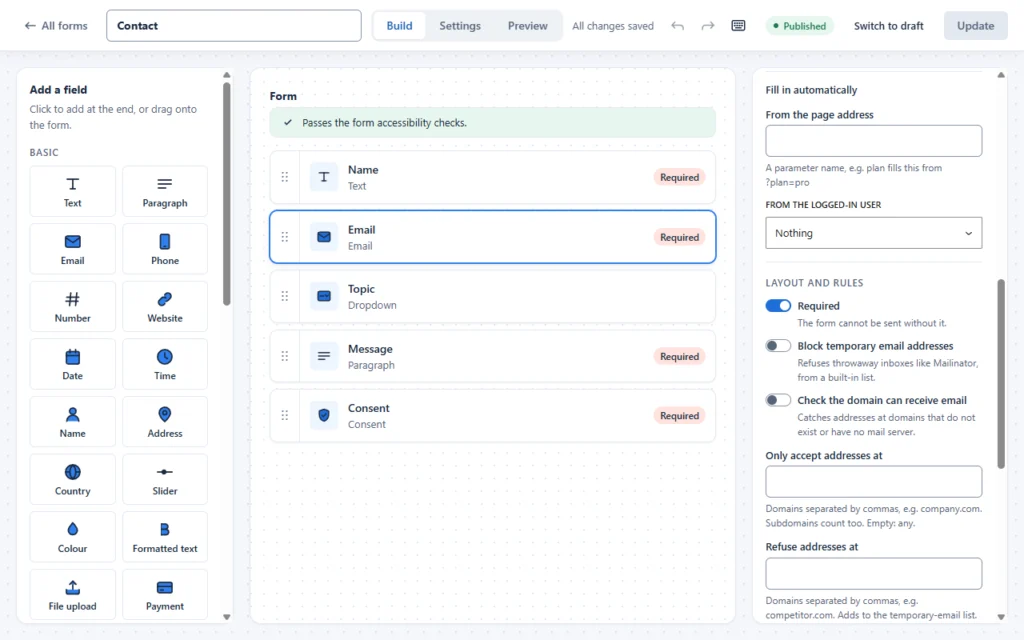
The most effective way to block disposable email is to check the address’s domain against a maintained list of throwaway services. In FillKite, click an email field in the builder and turn on Block temporary email addresses. It refuses addresses from a built-in list of nearly 9,000 disposable domains. The visitor sees a clear message asking for a different address, and nothing is saved.
Way 2: Check that the domain can receive mail
New disposable services appear all the time, and some people simply make up a domain. A second check asks the internet’s address book, DNS, whether the domain has a mail server at all. If it has none, no email can ever reach that address.
Turn on Check the domain can receive email on the email field. It catches typos such as “gmial.com” and invented domains, as well as some throwaway services that are not on any list yet. It adds a quick lookup when the form is sent, so the visitor barely notices.
Way 3: Add your own block list
Sometimes you need to block disposable email domains that no list covers yet, or other domains altogether, such as a competitor who keeps requesting your price list. FillKite’s Refuse addresses at box on each email field takes a comma-separated list of domains, and adds them to the temporary-email list for that field.
Way 4: Accept only company domains
Some forms are meant only for specific organisations: a staff portal, a partner request form, or a trial limited to business customers. For these, an allow list is stronger than any block list. FillKite’s Only accept addresses at box accepts a list of domains, such as your own company domain, and refuses everything else. Subdomains count too.
Use it carefully on public forms. Refusing all free mailbox providers, for example, would block many genuine small-business owners who use Gmail.
Way 5: Double opt-in for newsletters
For newsletter sign-ups, the final safeguard is double opt-in: the new subscriber must click a link in a confirmation email before they are added. A throwaway inbox may still receive that email, but most people who use one never come back to click. Most email marketing services offer it, including Mailchimp’s double opt-in and Brevo’s equivalent; turn it on there, and combine it with blocking at the form.
Block disposable email on a download form, step by step
- Open the download form in the FillKite builder and click its email field.
- Turn on Block temporary email addresses.
- Turn on Check the domain can receive email.
- Leave Only accept addresses at empty, unless the download is for one company.
- Add any domains you have already seen abused to Refuse addresses at.
- Update the form, then test it with a throwaway address and a real one.
The throwaway address should be refused with a clear message; the real one should go through. From then on, every address on your download list can actually receive your follow-up emails. Repeat the same steps on each form where you want to block disposable email.
Typos are not throwaways
Many “bad” addresses are simply mistakes: gmial.com, hotmial.com, a missing letter in a company domain. The domain check catches most of these, because the misspelled domain has no mail server. Make sure the error message treats the visitor kindly, for example “We could not find a mail server for this address. Please check it for typos.” Someone who fixes a typo becomes a real lead; someone told off for using a “fake” address may leave.
Plus addresses are not throwaways
Many careful people use plus addressing, such as [email protected], to sort their mail or spot who shares their address. These are real, permanent inboxes that reach the same person. Do not treat them as disposable. When you block disposable email, you are blocking throwaway domains, not the way someone organises a genuine mailbox. FillKite’s checks look at the domain, so plus addresses at real providers pass normally.
Flag instead of block on contact forms
On a contact form, the cost of refusing a real customer is higher than the cost of a throwaway reply. So rather than block disposable email there, let the entry through and mark it. FillKite gives every entry a Lead quality badge, High, Medium or Low, worked out from signals that include whether the address is disposable, whether the domain can receive mail, and whether it is a company or free mailbox. Filter the inbox to High first, and look at Low entries when you have time. You keep the rare genuine enquiry without letting throwaways crowd out real leads.
Using the checks together
The five ways work best in layers. On a download form, turn on the disposable list and the domain check, and add any domains you see abused to the block list. On a newsletter form, add double opt-in on top. On a company-only form, use the allow list and nothing else. On a contact form, leave blocking off and let lead quality flag the throwaway addresses.
Protecting discounts and trials
Offers such as a first-order discount or a free trial attract repeat claims: the same person signing up with a new throwaway address each time. When you block disposable email on these forms, most repeat claims stop, because creating a new real mailbox takes far more effort. Add FillKite’s duplicate flag, which marks a second entry from the same address within a set number of minutes, and a rate limit on how often one visitor can send the form, and abuse becomes too much trouble to be worth it. Honest customers notice none of this, which is exactly how you want to block disposable email.
What the visitor sees
When you block disposable email, the message matters. A vague “Invalid email” frustrates people who typed a real address with a typo. FillKite shows a clear message next to the field asking for a different address, and keeps everything else they typed, so they can fix it and send. Our guide to form abandonment explains why clear errors matter so much.
Beyond your forms
Your FillKite forms are one entry point. Account registration in WordPress itself, shop checkouts and comment forms are handled by WordPress or other plugins, and each needs its own settings if you want to block disposable email there too. Decide per area: a shop may accept any address for guest checkout, while a membership site blocks throwaways at registration. Keeping the rules consistent across your site avoids confusing visitors who meet different answers in different places.
Registration and account forms
If your forms create accounts, for example for a membership or a course, you almost always need a working email address: for password resets, receipts and important notices. It makes sense to block disposable email on these forms, and to add the domain check. For extra certainty, send a confirmation link and activate the account only when it is clicked.
Privacy considerations
Some visitors use throwaway addresses because they fear spam. If you block disposable email, earn their trust in return: say plainly what you will send, how often, and how to unsubscribe, and link to your privacy policy next to the form. Visitors are far more willing to give a real address when they believe it will be respected. Our guide to the GDPR contact form covers what to say.
Measure the effect
After you block disposable email on a form, watch three things for a month:
- Entries per week: may dip slightly, as throwaway sign-ups disappear.
- Bounce rate on your emails: should fall, which protects your sender reputation.
- Replies and conversions: should rise as a share of entries, because more addresses are real.
If entries fall sharply, check the error message and consider whether the form is one where blocking fits. On a download form, fewer but real leads is usually a good trade.
A checklist to block disposable email
- Blocking is on for download, trial, discount and newsletter forms.
- The domain check is on wherever blocking is on.
- Contact and support forms flag rather than block.
- The error message is friendly and explains what to do.
- Your own block list covers any domains you see abused.
- Double opt-in is on in your email marketing service.
- Bounce rates and conversions are checked after a month.
Where blocking goes wrong
| Mistake | What happens | Do this instead |
|---|---|---|
| Blocking on support forms | Paying customers cannot reach you | Block only where the address is the price |
| Blocking all free mailboxes | Genuine small businesses refused | Use an allow list only for private forms |
| A vague error message | People with typos give up | Say what to do next |
| Relying on a list alone | New throwaway domains slip through | Add the domain check |
| No spam protection | Bots still flood the form with real-looking addresses | Keep honeypot and spam score on |
Blocking throwaway addresses is one layer of spam defence, not all of it. Our guide to WordPress form spam covers the others.
Review your lists twice a year
Your own block and allow lists need occasional care. A domain added in a hurry may belong to a real company, a partner may change their email domain, and some throwaway services close down. Twice a year, as part of the routine you use to block disposable email, read through the domains you have added, remove any that no longer make sense, and send a test from a real address at each allowed domain to confirm it still works.
Frequently asked questions
How do I block disposable email in WordPress forms?
Use a form plugin that checks addresses against a disposable domain list. In FillKite, turn on Block temporary email addresses on the email field, and add the domain check for extra coverage.
Will blocking stop real customers?
Rarely, if you use it on the right forms. Avoid it on support and contact forms, where a privacy-minded customer may still have a genuine question.
How often is the list updated?
The built-in list is updated with FillKite releases. The domain check catches new services that are not on the list yet, and you can add domains yourself.
Should I block disposable email on a quote form?
Usually not. Someone asking for a quote wants a reply, so throwaway addresses are rare there. Flag them with lead quality instead, and keep the form as easy as possible.
Does blocking slow the form down?
The list check is instant. The domain check adds a quick DNS lookup when the form is sent, usually a fraction of a second. Visitors barely notice either.
Can I block disposable email on only one field?
Yes. The settings are per email field, so you can block on a download form and leave your contact form open.
Can developers extend the list?
Yes. FillKite has a fillkite_disposable_domains filter for adding or removing domains in code.
Block disposable email where it matters. FillKite checks every email field against nearly 9,000 throwaway domains, confirms the domain can receive mail, and lets you set your own allow and block lists. Read the spam protection guide, see every feature, or install FillKite free from WordPress.org.